Jutsu Studio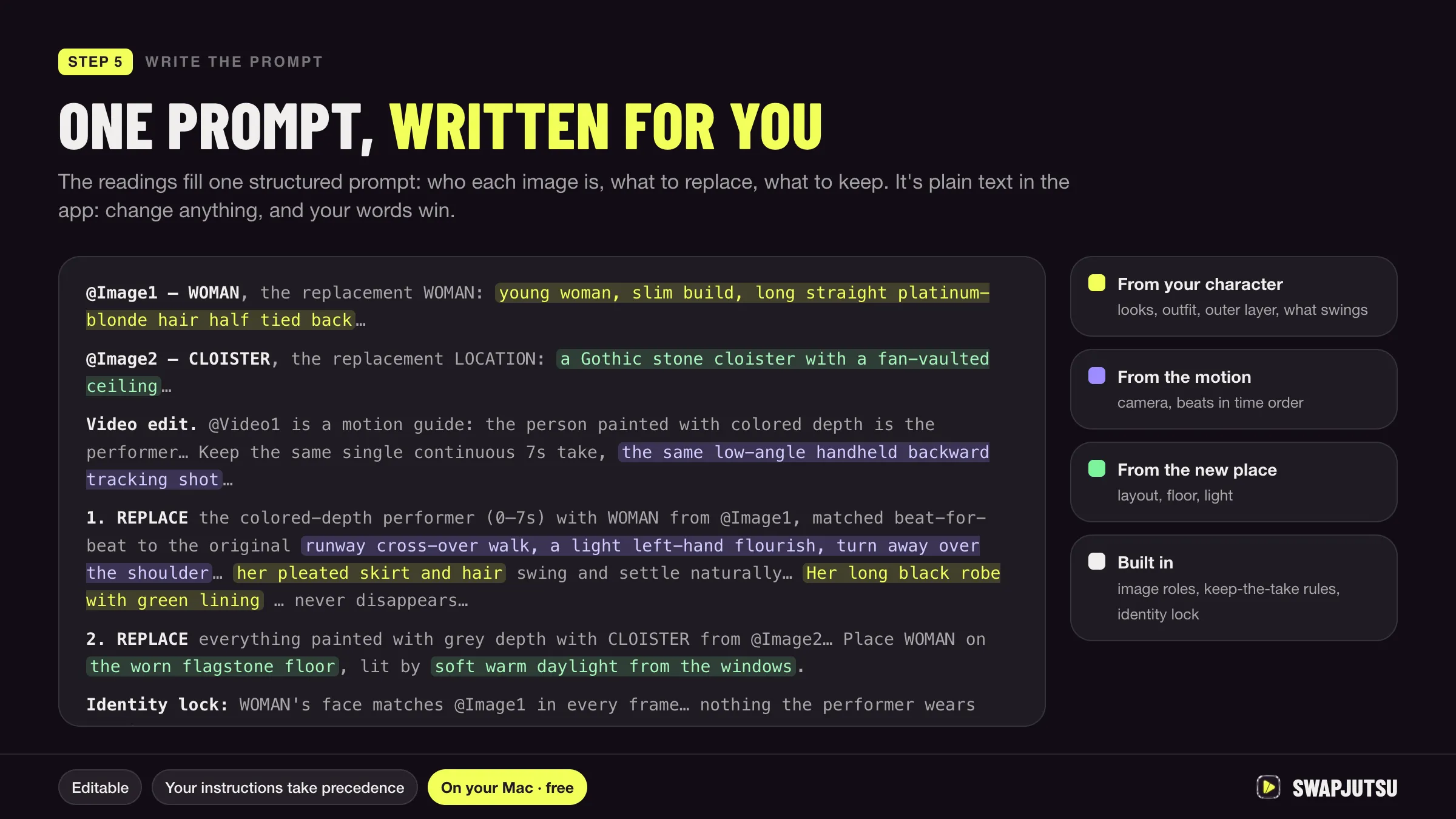
In short
- ByteDance's formula for Seedance 2.0: subject, action, scene, lighting and color, camera movement, style, image quality, constraints.
- Seedance 2.5 understands integer-second timestamps; Seedance 2.0 ignores timestamps and follows only shot numbers.
- Edit prompts need a trigger word such as replace, add or remove, and should name the video directly ("Video 1"), not "reference Video 1".
- ByteDance suggests one camera movement per shot and four or five reference assets per request, well under the limit.
A good Seedance prompt reads like a shot list, not ad copy. ByteDance’s own guide puts it this way: say who is doing what, where, how the camera moves and in what order, then tighten the result with style, quality and constraint words. With references, say what each image, video or audio file is for.
Everything below comes from ByteDance’s Seedance 2.0 and 2.5 prompt guides on BytePlus, updated September 28 and October 16, 2026. The example prompts are ours, written to follow those patterns.
The basic structure
ByteDance’s advanced formula for Seedance 2.0:
precise subject + action details + scene/environment + lighting and color tone + camera movement + visual style + image quality + constraints
The 2.5 guide arranges the same parts into three blocks:
- One-sentence summary. Subject, location, event, genre or style, camera movement.
- Detailed plot. Split into “Shot N” or timestamps, each with its visuals, camera, actions, dialogue and sound.
- Additional notes. What must stay consistent throughout: camera angle, environment, sound, atmosphere.
Two version differences change how you write. Seedance 2.0 ignores timestamps and follows only shot numbers; ByteDance also says its timing control is unstable and forcing durations can break the result. Seedance 2.5 supports integer-second timestamps, recommends 1-second units, and asks you to keep the timeline continuous with no gaps.
Writing each part
- Subject. Two or three stable, visible features: clothing, hairstyle, category. “The woman in a red dress and a straw hat”, not “a confident woman”.
- Action. Name the body part and the degree: slowly raise a hand, quickly turn the head. On 2.0, ByteDance prefers slow, continuous movements over sprints, big jumps and rolls, and asks you to describe how one action flows into the next.
- Emotion. Show it physically. Instead of “very sad”: lowers her head, shoulders trembling slightly, eyes reddening.
- Camera. Standard terms work: medium shot, close-up, wide shot, slow push-in, lateral tracking, fixed shot. Use one camera movement per shot; stacking push, pan and track makes the image unstable. For a niche term, add a short explanation after it.
- Style and quality. “Cinematic texture, natural colors, soft lighting”, “2D Japanese anime style”. Without a style word, an animated character can drift toward live action.
- Constraints. “Keep it subtitle-free”, “do not generate a logo”, “do not generate a watermark”. On 2.5, “no BGM” and “no audio” also work.
- Sound on 2.0. The 2.0 guide uses symbols: music in (), sound effects in < >, dialogue in { }, on-screen subtitles in 【】.
Example prompts
Text to video
Slow-paced realistic documentary style. An old fisherman in a yellow raincoat and a gray wool cap mends a net on a wooden pier at dawn. Shot 1: wide shot, fixed camera; he pulls the net across his knees with slow, steady hands. Shot 2: close-up of his fingers tying a knot; the camera slowly pushes in. Soft blue morning light, light fog over the water.
Natural colors, rich detail. Keep it subtitle-free, no logo, no watermark.
Image to video (first frame)
Set the image role to first frame in the request, which on 2.5 locks the aspect ratio to the image, then describe only what happens next:
Image 1 is the first frame. The girl lifts her head from the book and looks toward the window. Light rain starts on the glass. The camera slowly pulls back to a medium shot. Warm indoor light, quiet room tone, no music. No subtitles.
Reference to video
Use the knight in Image 1 as the main character and the ruined chapel in Image 2 as the scene. Refer to the orbiting camera movement in Video 1. 0-4 seconds: the knight walks slowly down the aisle, armor catching the light from the broken windows. 4-8 seconds: he kneels and lays his sword on the altar; the camera orbits once around him. Dark fantasy style, cold blue light with warm candle highlights. The knight’s appearance must strictly follow Image 1 and stay consistent throughout, with no face changes. No subtitles.
The 0-4 and 4-8 timestamps are for 2.5. On 2.0, write Shot 1 and Shot 2 instead.
Video edit
Replace the man in the gray hoodie in Video 1 with the woman from Image 1. Keep the camera, the background and her movements the same as the original. No subtitles.
On 2.5, an edit keeps the source’s aspect ratio and length; the request must set the ratio to adaptive and the duration to -1. A timed edit looks like ByteDance’s own example: change the man’s action from drinking coffee to mopping the floor from 4-6 seconds in Video 1, and leave the rest unchanged.
Referencing images, video and audio
- Number by upload order. Image 1, Video 1, Audio 1, matching the order the files were sent.
- Say what each asset is for. “Refer to the action in Video 1 and the camera movement in Video 2.” “Refer to Image 1 for lighting.” If only part of an asset matters, say which part.
- Do not describe what the reference already shows. “Strictly follow the actions and camera movements in Video 1” beats re-describing every gesture.
- Bind people to assets in text. For many characters, list them: “Images 1-2 are Character 1 and correspond to Audio 1.” Do not rely on names written on the image.
- For edits and extensions, name the video directly. ByteDance’s 2.0 guide warns that “reference Video 1” in an edit makes the model treat it as a reference task. On 2.5, an edit needs a trigger word such as edit, add, remove, modify, replace or change to; an extension needs extend forward, extend backward or continue.
- Use fewer assets than the limit. Seedance 2.5 accepts up to 50, but ByteDance’s 2.0 guide recommends four or five, and more can cause style conflicts and blurred subject identification.
For keeping one person stable across many clips, see Seedance character consistency.
What to avoid
- Copywriting. “A man runs nervously down the street, very cinematic” is ByteDance’s own negative example. Break it into shots.
- Timing too tight or too loose. On 2.5, too much plot in a short range causes extra cuts or skipped beats; too little lets the model improvise. Do not use timestamps for fast repeated actions.
- Mixed languages in dialogue. Keep dialogue in one language, apart from proper nouns.
- Strong emotional words on faces. The 2.5 guide notes words like “fanatical” can make eyes glow; use neutral wording and add “normal human eyes, no glowing eyes”.
- A whole script as the prompt. Long, redundant text confuses which character is which.
- Contradictions. Two conflicting features for the same subject, or a camera move the scene cannot support.
ByteDance also publishes an official prompt-optimizing skill for Seedance 2.5, sd25-pe, installed with npx, if you want a model to restructure your draft. To have Claude Code, Codex or Cursor write the whole prompt from your files, with the reference table and settings, see the open-source Seedance 2.5 prompt skill.
How Swapjutsu writes a structured prompt
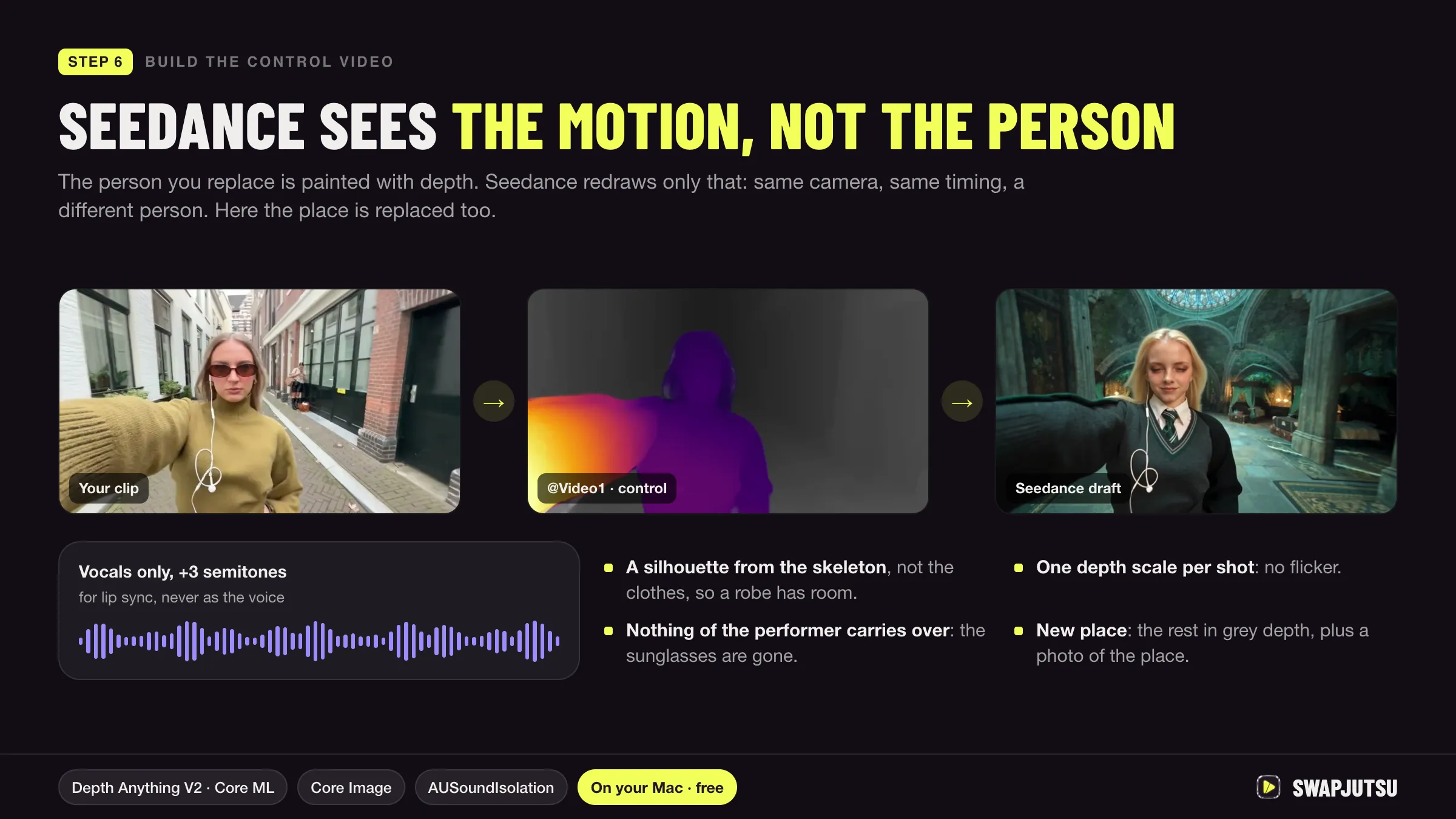
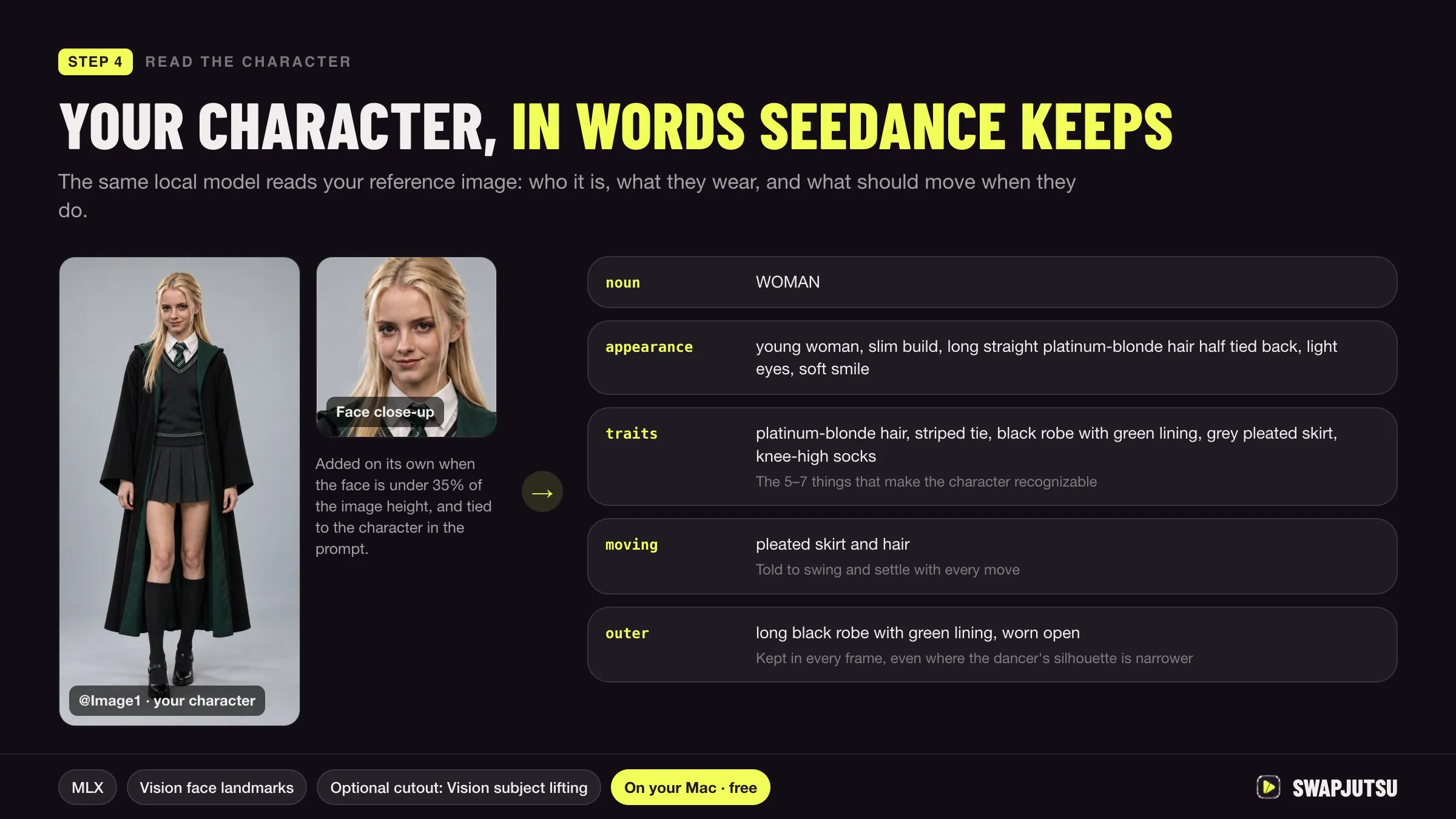
Swapjutsu, a free, open-source Mac app for character swap, writes this kind of prompt for you. During prep, a pose tracker times the moves in your clip and a local vision model on the Mac names them; in step 5 the same model reads each character image into words. The app combines what it read into one structured Seedance prompt, which you can edit before rendering. The README recommends downloading Qwen3-VL 8B in Settings › Prompt for the best prompt; it needs 16 GB of memory.
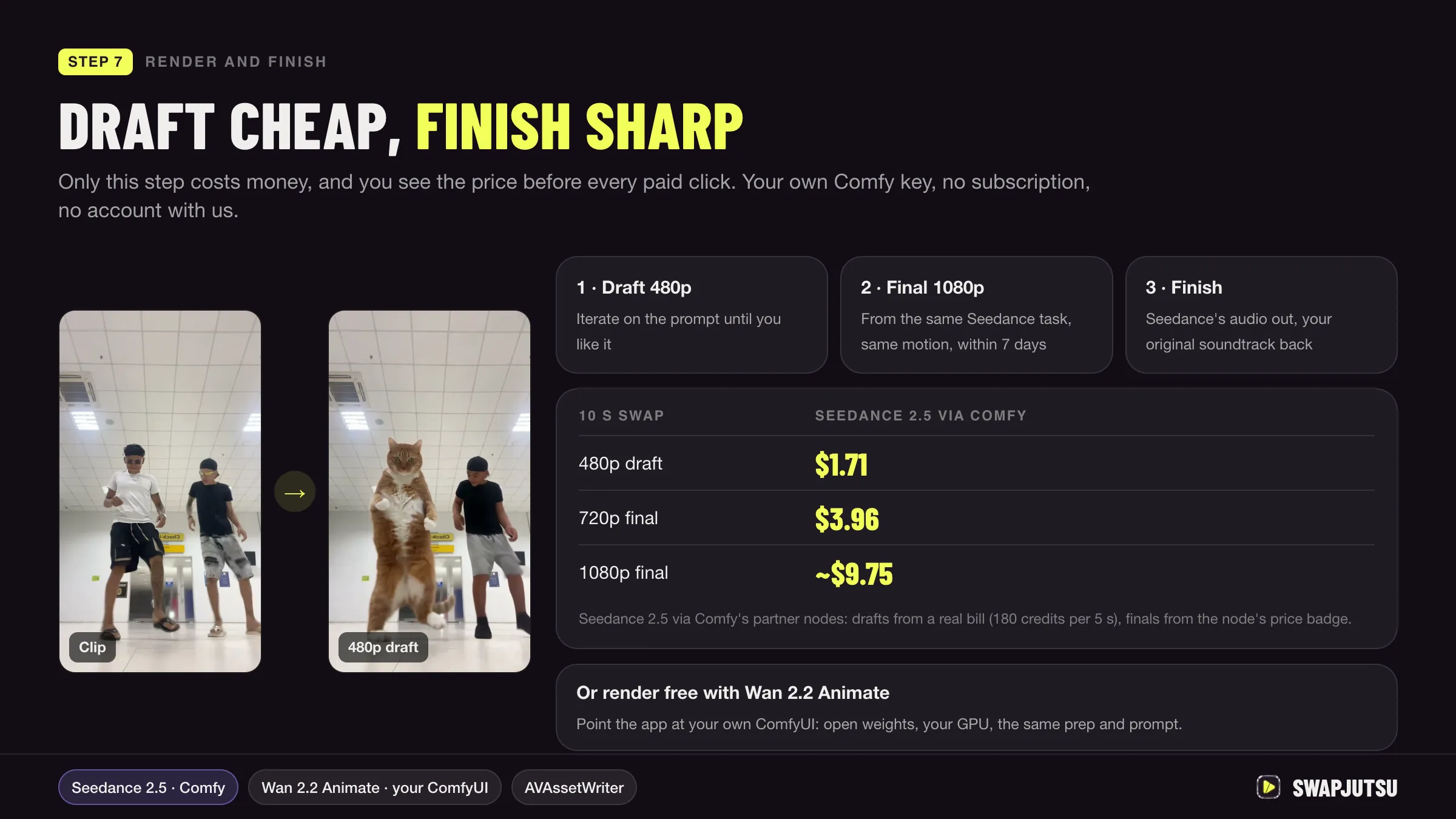
Generate Draft then shows the price before anything is sent. Swapjutsu’s README puts a 10-second Seedance 2.5 render through Comfy at $1.71 as a 480p draft and about $9.75 at 1080p. For the whole process, see how to swap a character in a video.
Sources
- BytePlus ModelArk: Dreamina Seedance 2.0 series prompt guide (updated September 28, 2026)
- BytePlus ModelArk: Dreamina Seedance 2.5 prompt guide (updated October 16, 2026)
- BytePlus ModelArk: Dreamina Seedance 2.5 tutorial (updated October 20, 2026)
- Comfy docs: Seedance 2.5 workflows
- Swapjutsu on GitHub (README, October 20, 2026)
Swap characters on your Mac.
Swapjutsu is free and open source. The prep runs on your Mac; only the render is billed, or nothing on your own ComfyUI.