Jutsu Studio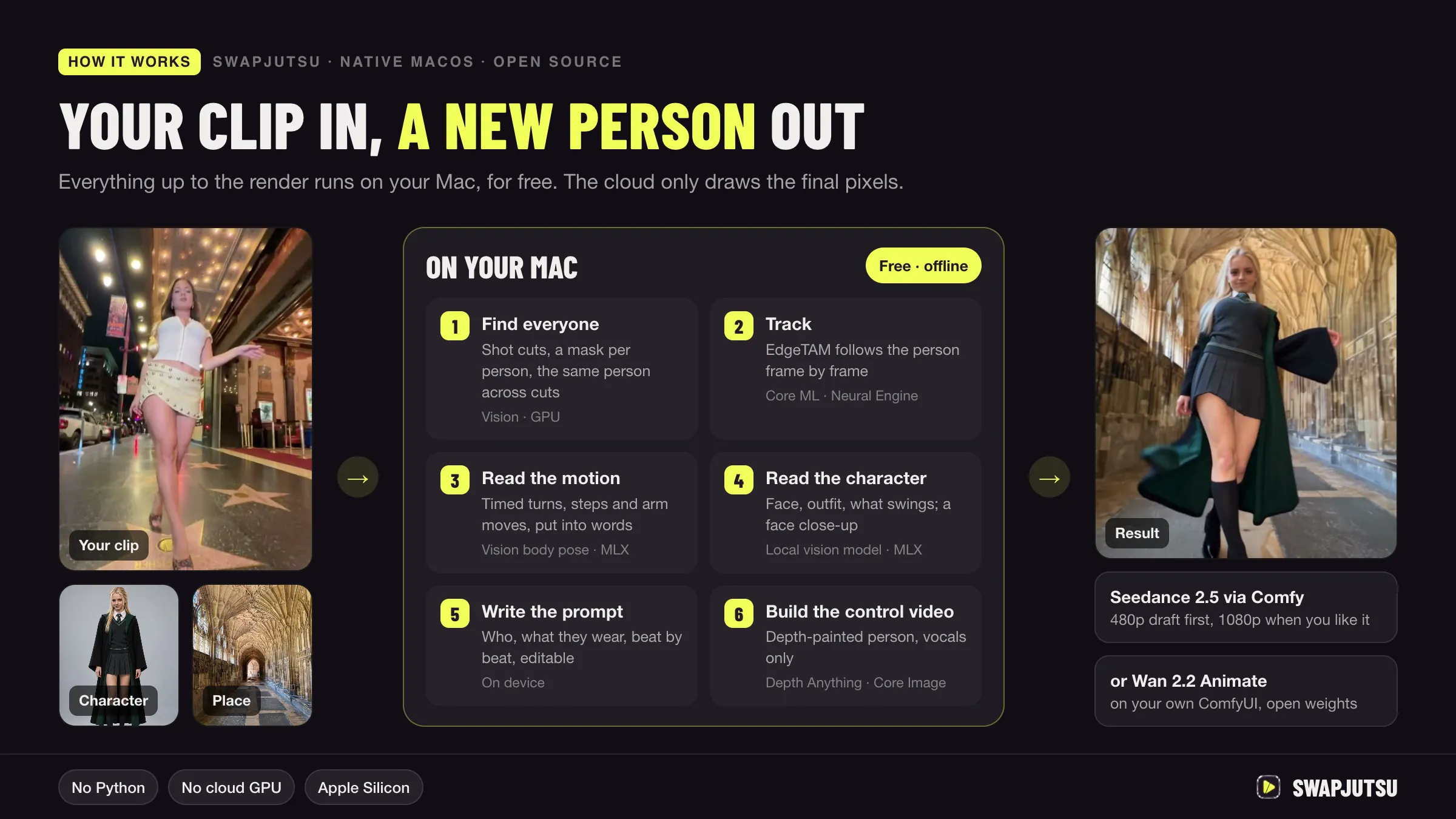
In short
- Local video generation on a Mac needs a lot of memory: LTX Desktop asks for macOS 26 and 48 GB for full local generation, ltx-video-mac at least 32 GB.
- Draw Things is free on the Mac App Store and lists Wan 2.2, LTX-2.3 and MiniMax H3 among its models.
- Kling ships a desktop app for Apple Silicon and Intel Macs (version 1.3.2); generations use Kling credits.
- DiffusionBee does not generate video: its last release, 2.5.3 from August 2024, added Flux image models.
The best AI video generator for a Mac depends on where the model runs. If your Mac has 32 GB or more of unified memory, Draw Things, LTX Desktop and ComfyUI can generate video on the machine for free. If it doesn’t, or you want Kling, Seedance or Genjutsu quality, use a native app that sends jobs to the cloud: Kling’s desktop app, or Jutsu Studio for Higgsfield.
Every app below installs on a Mac, and each was checked on October 20, 2026. Two of them, Jutsu Studio and Swapjutsu, are this site’s own apps and are marked as such.
At a glance
| App | What it does | Where it runs | Price as published | Mac needs |
|---|---|---|---|---|
| Draw Things | Images and video from open models | On the Mac | Free; optional Draw Things+ ($8.99) for cloud compute | macOS 12.4+ |
| LTX Desktop | LTX video: text, image and audio to video, plus an editor | On the Mac, or LTX’s API | Free, Apache-2.0 | macOS 14+; local needs macOS 26 and 32–48 GB |
| ltx-video-mac | LTX-2.x and MiniMax H3 video | On the Mac (MLX) | Free, MIT | macOS 14+, Apple silicon, 32 GB |
| ComfyUI Desktop | Node workflows for any open model | On the Mac | Free, GPL-3.0 | Apple silicon |
| Kling AI desktop | Kling’s models, including Motion Control | Cloud | Free app; plans from $8.80 a month | Apple silicon or Intel |
| Jutsu Studio (ours) | Higgsfield’s video models: Genjutsu, Seedance, Kling, Wan | Cloud (Higgsfield) | Free app; Higgsfield bills generations | macOS 14+, Apple silicon or Intel |
| Swapjutsu (ours) | Character swap in an existing clip | Prep on the Mac, render in the cloud or on your ComfyUI | Free app; $1.19 for a 7 s 480p draft | macOS 15+, Apple silicon |
| CapCut desktop | Editor with Seedance 2.5 AI video | Cloud | Credits on Pro and Ultra; prices in app | macOS 10.14+ |
| Filmora | Editor with image-to-video and text-to-video | Cloud | $59.99 a year with 1,000 AI credits a month | Mac version available |
| Topaz Video | Upscaling and enhancing, not generation | On the Mac | $299 a year | Mac or PC |
Local and free: Draw Things, LTX, ComfyUI
Draw Things is the easiest start. It is free on the Mac App Store and works offline. Its listing names Wan 2.2, LTX-2.3 and MiniMax H3 for video next to image models like FLUX and Qwen Image, and says it is optimized for Apple silicon Macs. The only purchases are Draw Things+ and “Boost” bundles for extra cloud compute.
LTX Desktop is Lightricks’ own open-source app for its LTX models. Text to video, image to video and audio to video all run locally, and it includes a video editor. The catch is hardware: per its README, full local generation needs macOS 26 and 48 GB or more; 32 GB is limited to 540p and 5 seconds; below 24 GB and on Intel Macs it falls back to LTX’s cloud API. On macOS 14 and 15 the app runs, but local generation isn’t available yet.
ltx-video-mac is a community-built native SwiftUI app that runs LTX-2, 2.3 and 2.5 and MiniMax H3 through Apple’s MLX framework. It asks for macOS 14, Apple silicon and at least 32 GB of memory, 64 GB recommended for higher resolutions.
ComfyUI Desktop packages ComfyUI for Apple silicon Macs. It runs open models such as Wan 2.2 and LTX as node graphs, which makes it the most flexible and the hardest to learn. See running ComfyUI on a Mac and Wan 2.2 on a Mac for what to expect from each chip.
All four cost nothing per clip. You pay in memory, disk space and render time, and none of them reaches the quality of the newest cloud models.
Cloud models in a native app: Kling, Jutsu Studio, Swapjutsu
Kling AI has its own desktop app, version 1.3.2, with separate downloads for Apple silicon and Intel Macs. Kling’s guides give steps for both the web and the app, Motion Control included. Kling’s plans start at $8.80 a month for 660 credits after a discounted first month; commercial use and watermark removal need a paid plan.
Jutsu Studio (ours) is a free, open-source Mac app for Higgsfield. Higgsfield has no desktop app of its own, and Jutsu Studio is unofficial. You connect your Higgsfield account or API key, and it runs Genjutsu, Seedance 2.5, Kling 3.0 Motion Control, Wan 3.0 and Higgsfield’s other video models. It trims the clip on your Mac so only the range you pick is uploaded and billed, shows the price on the Generate button, queues jobs in the background and saves every result with its prompt and cost to your disk. Generations are billed by Higgsfield at its own prices; see the price table.
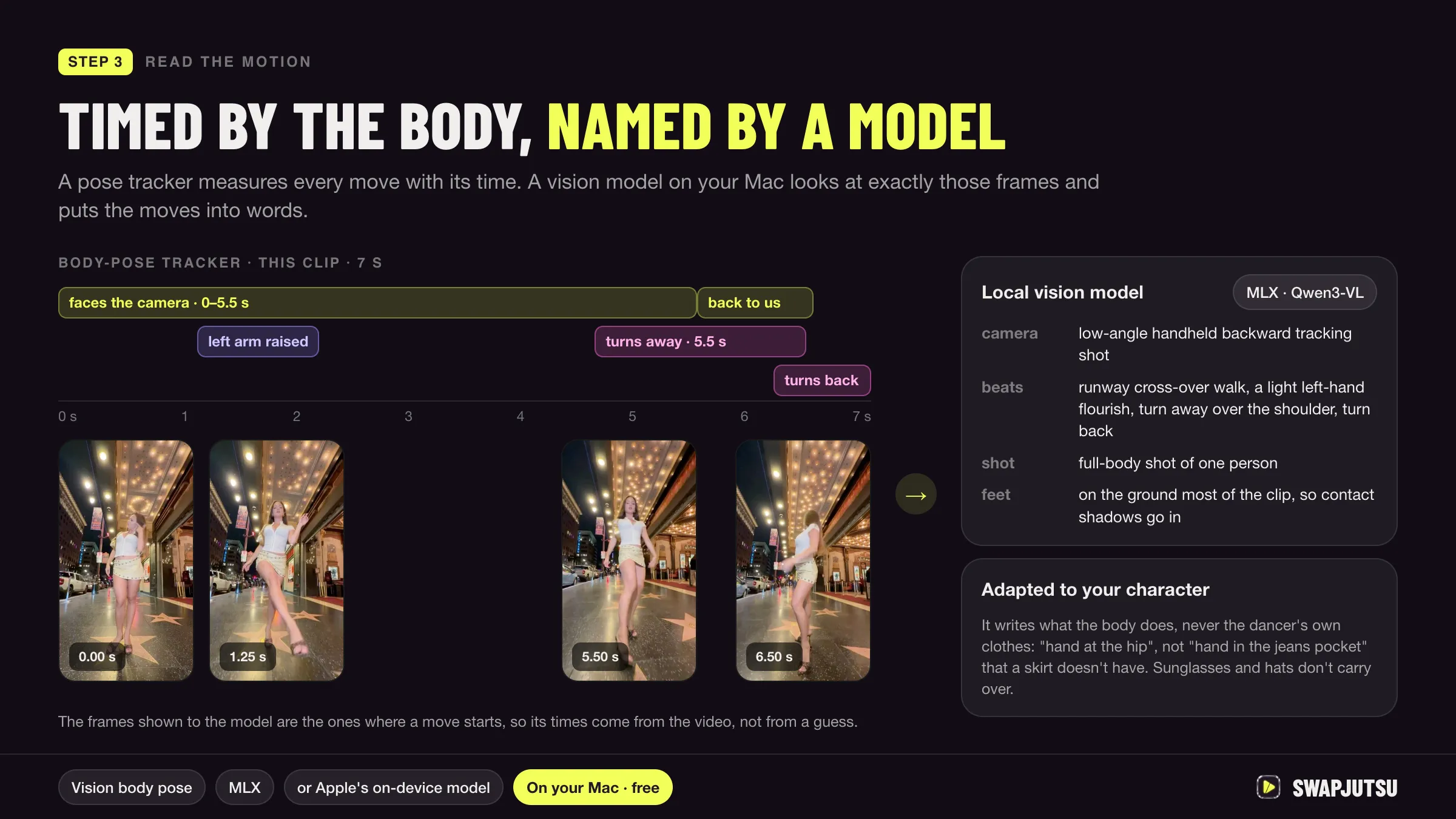
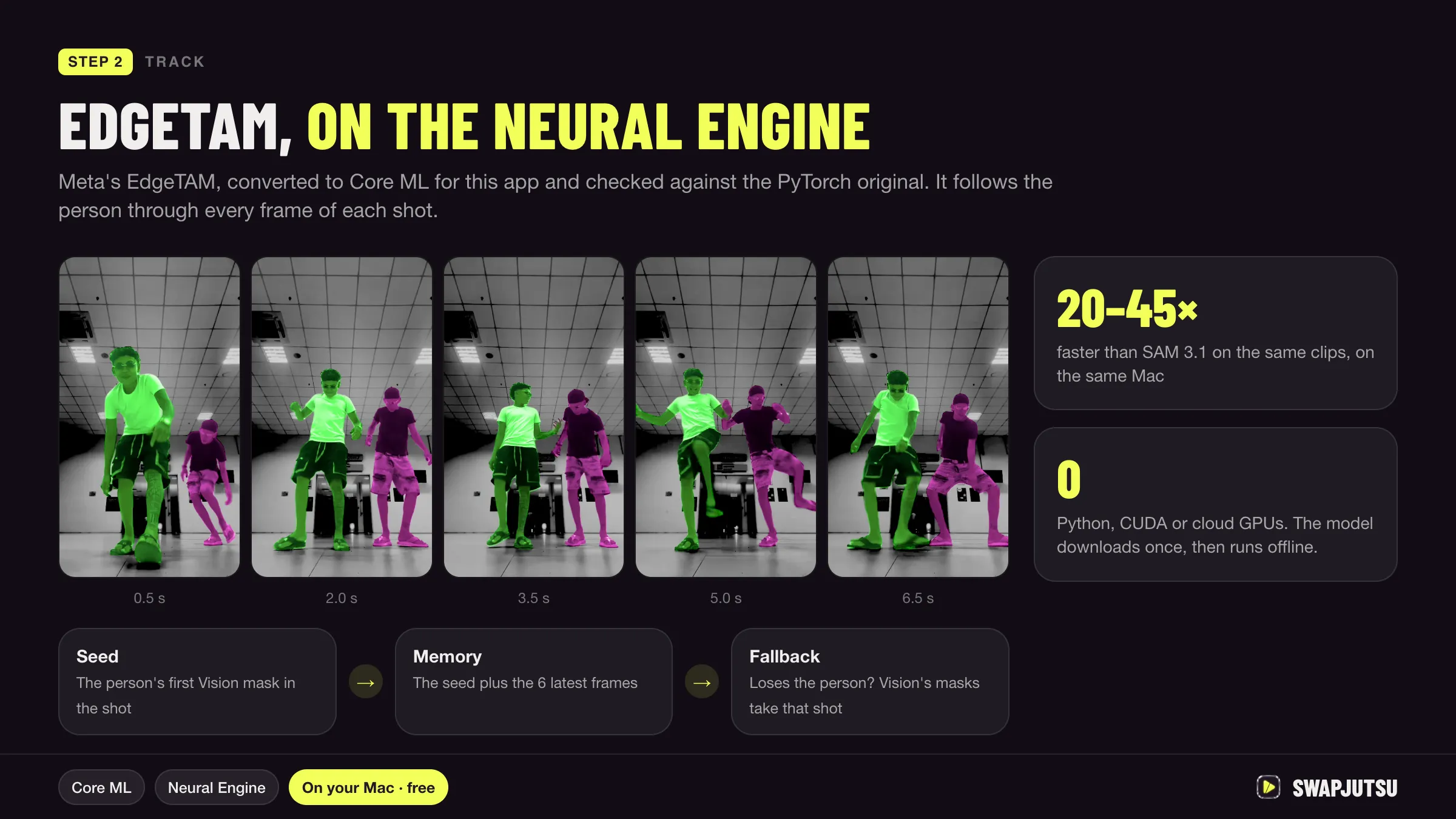
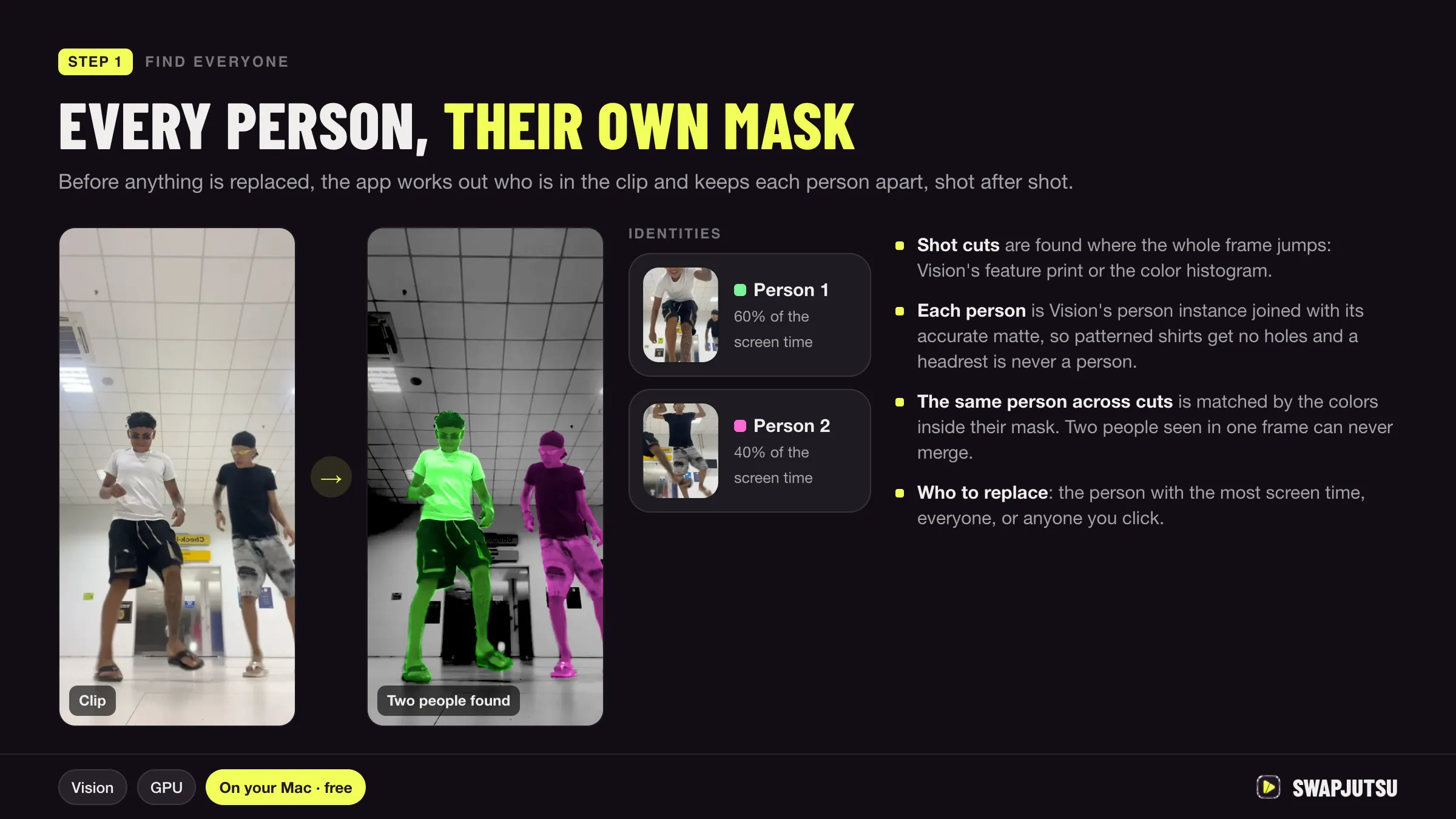
Swapjutsu (ours) does one job: put a new character into an existing clip and keep the camera, moves and timing. The analysis runs on the Mac for free (cuts, a mask per person, tracking on the Neural Engine, pose and depth). Only the render leaves the machine, to Seedance 2.5 through Comfy’s API, or to Wan 2.2 Animate on your own ComfyUI at no cost. Its README lists a 7-second 480p draft at $1.19 and a 10-second render at $1.71 at 480p, $3.96 at 720p and about $9.75 at 1080p. More in how to swap a character in a video.
AI inside video editors: CapCut and Filmora
If you mostly edit and want generation as one tool among many, an editor may be enough.
CapCut desktop runs on macOS 10.14 or later. CapCut’s page says you can create AI videos with Seedance 2.5 and refine them in the editor. CapCut’s own article says Pro and Ultra members pay for Seedance 2.5 in credits billed by the second, and points to the in-app pricing page for amounts, so the price per clip isn’t published on the web.
Filmora has a Mac version. Its pricing page lists image to video, text to video, AI idea to video and video extend as paid with AI credits: the Advanced plan is $59.99 a year with 1,000 AI credits a month, Premium $99.99 a year with 2,000. The free and Basic plans include no AI credits. The credit cost per clip isn’t on the pricing page.
Upscaling: Topaz Video
Topaz Video doesn’t generate video. It upscales, denoises and smooths what you already have, which is often the last step for a 720p AI clip. It runs on the Mac with unlimited local rendering and costs $299 a year on its own, or comes in Topaz Studio, $399 a year ($199.50 for the first year on the offer shown on October 20).
Apps that don’t fit
- DiffusionBee is image-only. Its last release, 2.5.3 in August 2024, added Flux image models and nothing for video.
- Higgsfield has no Mac app; it runs in the browser, with an API, MCP and CLI.
- Open-Generative-AI has macOS installers but isn’t notarized, needs a Muapi.ai key for its cloud models, and runs only image models locally on a Mac. It is covered in open-source Higgsfield alternatives.
Which to choose
- Free and offline, any Apple silicon Mac: Draw Things.
- Free, local, with 48 GB or more: LTX Desktop.
- Full control over open models: ComfyUI Desktop.
- Kling only: Kling’s desktop app.
- Higgsfield’s models with a queue, local files and the price on every button: Jutsu Studio.
- Replace the people in a clip you already have: Swapjutsu.
- Editing first, generation second: CapCut or Filmora.
- Make an AI clip sharper: Topaz Video.
Prices and model lists change often; every figure above is from the source listed below, on the date shown there.
Sources
- Mac App Store: Draw Things: Offline AI Art (checked October 20, 2026)
- GitHub: Lightricks/LTX-Desktop (README, release 1.3.1, October 19, 2026)
- GitHub: james-see/ltx-video-mac (README, release 2.3.87, October 11, 2026)
- Comfy docs: system requirements
- Kling AI: Motion Control user guide, with desktop downloads (checked October 20, 2026)
- Kling AI: membership plans (checked October 20, 2026)
- CapCut: desktop video editor
- CapCut: Is CapCut PC free for AI video editing? (August 7, 2026)
- Filmora: pricing (checked October 20, 2026)
- Topaz Labs: pricing (checked October 20, 2026)
- GitHub: DiffusionBee releases (2.5.3, August 14, 2024)
- GitHub: Anil-matcha/Open-Generative-AI (README)
- GitHub: jutsuhq/jutsu-studio
- GitHub: jutsuhq/swapjutsu-seedance-character-swap (README)
Run Higgsfield from your Mac.
Jutsu Studio is a free, open-source Mac app for Higgsfield: a queue, a local library and the price on every button.