Jutsu Studio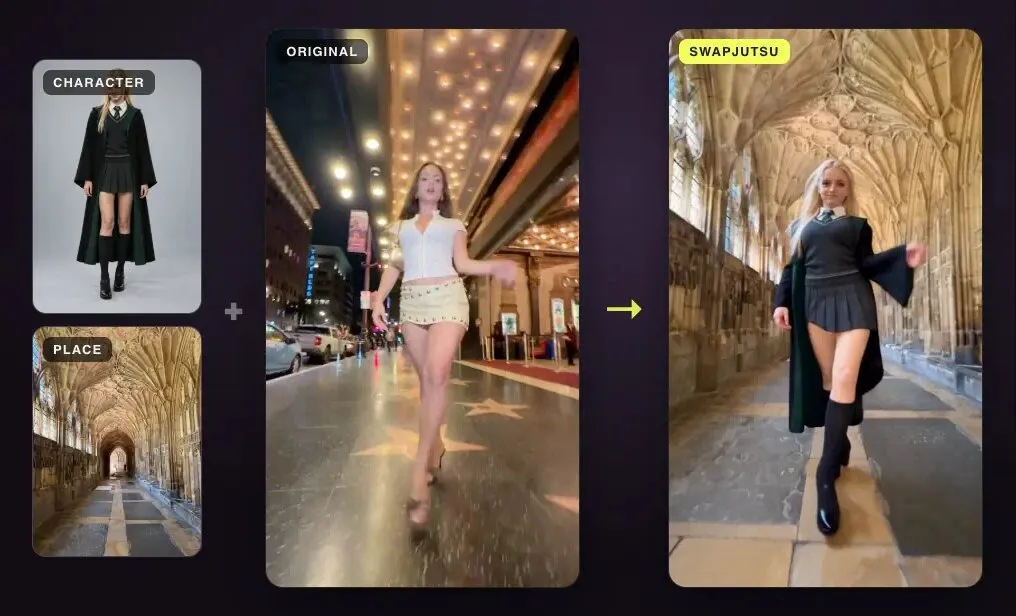
In short
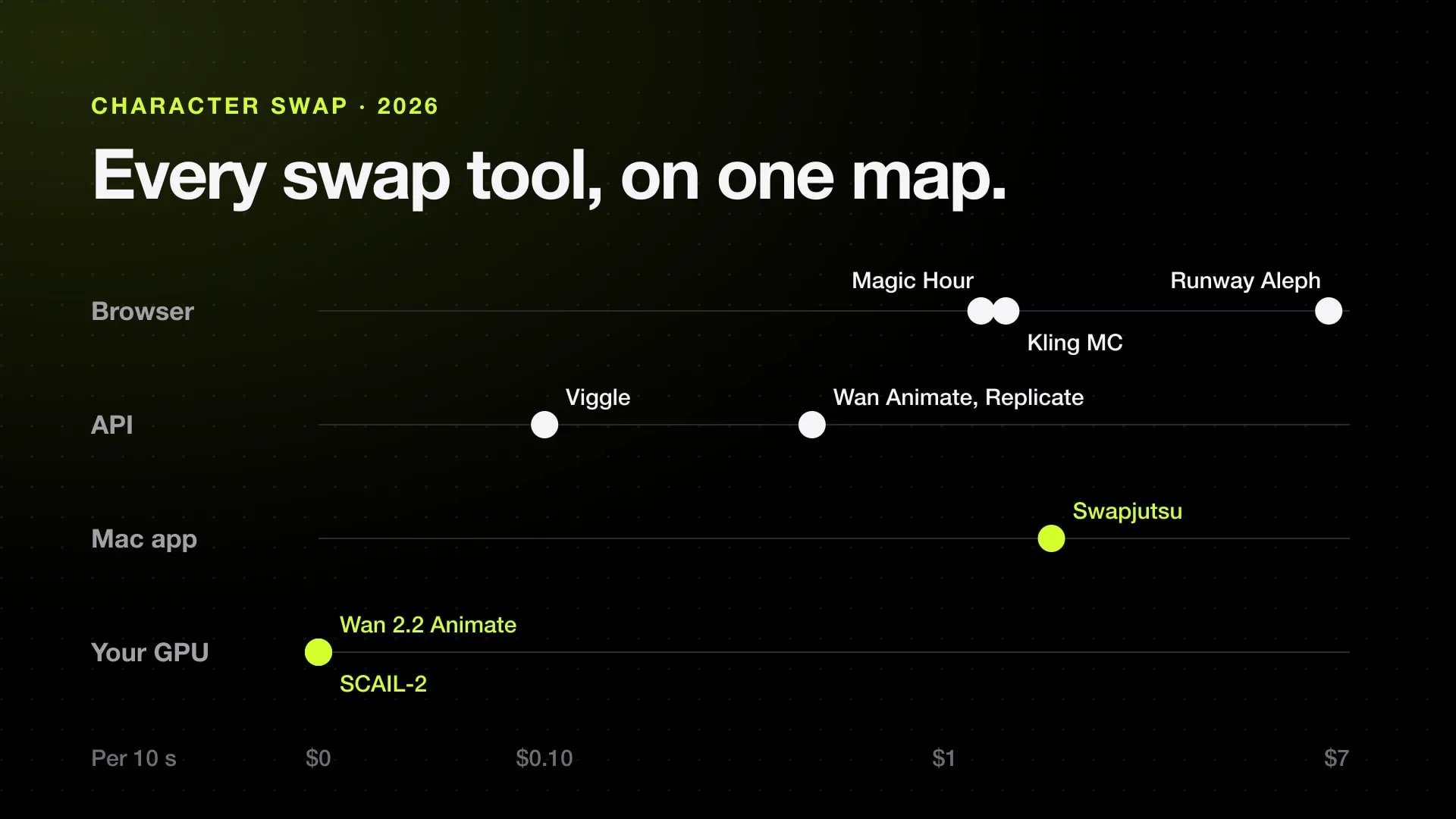
- Viggle's own API is the cheapest cloud route checked: character replacement costs $0.01 a second of driving video, so about $0.10 for 10 seconds.
- In the apps, 10 seconds of character replacement costs about $1.20 on Magic Hour, $1.36 on Kling Motion Control 3.0 Standard and $6.72 on Runway Aleph 2.0, from each one's published rates.
- Free and open source: Wan 2.2 Animate (Apache 2.0), SCAIL-2 (Apache 2.0 code, MIT weights) and Viggle-Animate run on your own GPU; none of them supports a Mac officially.
- Swapjutsu is a free, open-source Mac app: the analysis runs on the Mac, the render costs about $0.17 a second as a 480p Seedance 2.5 draft, or nothing with Wan 2.2 on your own ComfyUI.
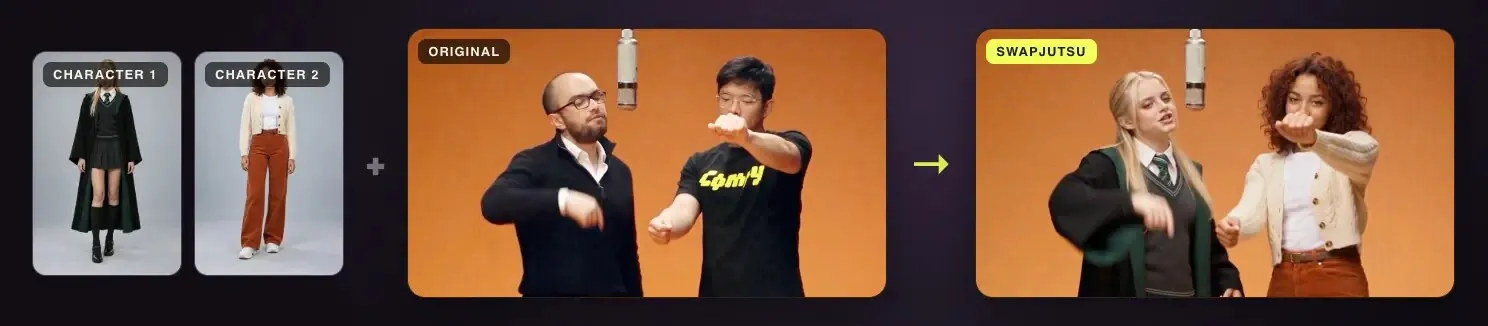
Viggle AI puts a character from one image into the motion of a video. The best Viggle alternatives for character replacement, swapping the whole person while the moves stay, split three ways: hosted apps that do the same job for credits (Magic Hour, Pika, DomoAI, Runway, Kling, Higgsfield), open-source models you run on your own GPU (Wan 2.2 Animate, SCAIL-2, Viggle’s own Viggle-Animate), and Swapjutsu, a free Mac app that does the analysis on your Mac and sends only the render to the cloud or to your own ComfyUI.
Prices below are each vendor’s published rates, checked on October 24, 2026, worked out for the same job: replace the person in a 10-second clip. Where a vendor does not publish a rate, the table says so instead of guessing.
The short answer
| Tool | Where it runs | Mac | Free tier and watermark | 10-second character swap |
|---|---|---|---|---|
| Viggle | Web, iPhone, Android, API | iPhone app on Apple silicon Macs | 5 videos a day; “no watermark” only on paid plans | About $0.10 through the API; app rate not published |
| Magic Hour | Web, API | Browser | Free tool: 3 a day, first 3 s, 480p | About $1.20 (480 credits from a $10 pack) |
| Pika Swap Anything | Web, iPhone, API | Browser | No credits on Free; no watermark on any plan | Not published |
| DomoAI Character to Video | Web, Discord, API | Browser | Watermark removed only on paid plans | Not published (“varies by video length”) |
| Runway Aleph 2.0 | Web, iPhone, API | Browser | 125 one-time credits, less than one clip | About $6.72 on Standard |
| Kling Motion Control 3.0 | Web, app, API | Browser | No monthly credits on Basic; watermark until Standard | About $1.36 on Standard |
| Higgsfield Recast | Web | Browser | Daily free credits | Not published |
| Wan 2.2 Animate | Your GPU, ComfyUI | No official support | Free, Apache 2.0 | $0 plus hardware |
| SCAIL-2 | Your GPU, ComfyUI | Community MLX port, 96 GB Macs | Free, Apache 2.0 code, MIT weights | $0 plus hardware |
| Swapjutsu | Mac app; render on Comfy or your ComfyUI | Native, Apple Silicon | Free and open source, no watermark | About $1.71 as a 480p Seedance 2.5 draft; $0 with Wan 2.2 on your ComfyUI |
How each figure is worked out, and what each tool is good at, follows.
What Viggle charges
Viggle’s pricing page lists a Free plan with 5 videos a day, one generation at a time, uploads up to a minute and assets kept for 7 days. Paid plans are Pro at $7.99 a month for 80 credits, Live at $15.99 for 200 credits and Max at $63.99 for 800 credits. “No watermark” appears only on the paid plans. The page says each feature uses a different number of credits and does not give a per-second rate, so the cost of a clip in the app can’t be worked out from it.
The developer API is clearer. One credit is $0.01, new API accounts get 100 credits, and character replacement with Viggle-Animate costs $0.01 per second of driving video, rounded up. A 10-second clip is about $0.10, which makes Viggle’s own API the cheapest cloud option here by a wide margin. Clips run 5–16 seconds in the normal mode and up to 60 seconds in agent mode.
There is no native Mac app. The iPhone app, Viggle AI: Meme Maker, is listed as running on Macs with an M1 or later.
Hosted alternatives
Magic Hour
Magic Hour added Character Replace on July 3, 2026, with Replace and Animate modes. It costs 48 credits a second, takes clips up to 60 seconds and outputs at most 1024 pixels on the long side. Ten seconds is 480 credits: $1.20 from a $10 pack of 4,000 credits, or about €0.43 on the Creator plan billed yearly (€129 for 144,000 credits). A free tool added on July 27 makes 3 generations a day without an account, but uses only the first 3 seconds at 480p and may add a watermark.
Pika Swap Anything
Pika’s swap tool is now called Swap Anything. Plans run from Starter at $10 a month for 900 credits to Fancy from $95, and Pika’s FAQ says downloads carry no watermark on any plan, Free included. The current pricing page doesn’t list what Swap Anything costs; the older Pikaswaps rates on Pika’s previous pricing page (35 credits per 5 seconds at 720p) may no longer apply, so they are left out of the table.
DomoAI
DomoAI runs in the browser and in Discord. Its Character to Video tool replaces a character in clips up to 30 seconds; the help center says the credit cost “varies by video length” without a rate. Plans start at $9 a month billed yearly for 600 credits, and the watermark is removed only on paid plans. DomoAI’s Video to Video is a different tool: a style transfer capped at 10 seconds.
Runway Aleph and Act-Two
Runway Aleph 2.0 edits a video with a prompt and a reference, including replacing a character, at 28 credits a second. Ten seconds is 280 credits, which is $6.72 on Standard ($15 for 625 credits) or $5.38 billed yearly. The older Gen-4 Aleph costs 15 credits a second ($3.60 for 10 seconds). Act-Two, at 5 credits a second, maps a performance onto a character image; it is closer to motion transfer than to replacing a person in a scene. The free plan’s 125 one-time credits don’t cover one 10-second Aleph clip.
Kling Motion Control
Kling’s Motion Control puts the motion of a driving video onto a character image. On Kling’s own plans, VIDEO 3.0 costs 9 credits a second on Standard and 12 on Professional, so 10 seconds is 90 credits, about $1.36 on the $10 Standard plan with 660 credits. Through Higgsfield’s API the same model is $0.126 a second at 720p. How Kling compares with Higgsfield’s own tools is in Kling Motion Control vs Genjutsu.
Higgsfield Recast and Genjutsu
Higgsfield has two apps for this job. Recast, titled “Character Swap” on its page, replaces the person in a video with a character from a photo and starts with daily free credits; it does not publish a price per clip. Genjutsu’s object swap does publish an API rate: $0.681 a second at 720p on the Higgsfield price table, about $6.81 for 10 seconds. More options for Genjutsu users are in Genjutsu alternatives.
Open-source alternatives
Open models cost nothing per clip and add no watermark. The price is hardware: each of them is a large video model that wants an NVIDIA GPU with a lot of memory.
Wan 2.2 Animate
Alibaba’s Wan 2.2 Animate is a 14B model released on September 19, 2025 under Apache 2.0. Its replace mode puts a character into the original video, with a relighting LoRA to match the scene’s light. ComfyUI ships a template for it, where the “Mix” mode does the replacement. The repository doesn’t mention Mac support; on Apple silicon it runs, slowly, as covered in Wan 2.2 on a Mac.
SCAIL-2
SCAIL-2 from zai-org animates a reference character from a driving video and also replaces characters (--replace_flag), with several reference images if needed. Code and weights were opened on June 9, 2026, the code under Apache 2.0 and the weights under MIT, with a ComfyUI integration from the same day. It renders at 512p or 704p, and replacement works better at 704p. The official repository doesn’t mention Macs. A community MLX port exists, but it needs about 70–76 GB of memory for a 5-second 832×480 clip, so it is limited to Macs with 96 GB or more.
Viggle-Animate
Viggle published its own replacement model, Viggle-Animate, on Hugging Face in September 2026. It is a 33.1B fine-tune of MiniMax H3 that replaces a character from one repainted frame and the driving video, without pose skeletons or masks. The code is Apache 2.0, but the weights use the MiniMax H3 Community License, and Viggle says one 80 GB card is not enough at bf16: it needs 96 GB or more, or offloading with about 12 GB resident and much slower runs.
Swapjutsu, on a Mac
Swapjutsu is a free, open-source (MIT) Mac app from the makers of this site. It splits a swap into two halves. Everything that makes a swap hold together runs on the Mac and costs nothing: cuts, a mask per person, tracking, pose, depth and the control video. Only the render leaves it, to one of two places:
- Seedance 2.5 through Comfy, billed in Comfy credits. A 5-second 480p draft with a reference video was billed 180 credits, 36 a second, and $1 buys 211 credits, so 10 seconds is about $1.71 as a draft. The 7-second example on the Swapjutsu page cost $1.19. Swapjutsu requests these renders without a watermark.
- Wan 2.2 Animate on your own ComfyUI, on this Mac, another Mac or a PC with a GPU on your network. That render costs nothing.
The app shows the price before it sends anything, and it ships an MCP server so Claude Code or another agent can prepare and render clips within a daily budget. The full walkthrough is in how to swap a character in a video.
What Swapjutsu does not do
- It runs only on Apple Silicon Macs with macOS 15 or later. There is no web, Windows or phone version.
- It is not a template app. Viggle’s ready-made dances and memes, and its one-tap sharing, have no equivalent.
- Preparing a clip takes time: about 3–5 seconds per second of video on an idle M4.
- Rendering needs either a Comfy account with credits or a ComfyUI machine with a capable GPU. It is not free end to end unless you have that machine.
- Seedance drafts are 480p; the final is rendered at 1080p and costs more.
- Viggle’s API is cheaper per second than a Seedance render.
Which to pick
- Cheapest in the cloud: Viggle’s API, at about $0.10 for 10 seconds, if you are comfortable calling an API.
- No watermark without paying: Pika, whose FAQ says no plan adds one, or an open model on your own GPU.
- Cheapest app in a browser, among those that publish a rate: Magic Hour or Kling Motion Control, both around $1.20–1.40 for 10 seconds.
- Long clips and prompt-driven edits: Runway Aleph, at a higher price.
- Free and open, with your own NVIDIA GPU: Wan 2.2 Animate or SCAIL-2 in ComfyUI.
- A Mac, files on your disk, the analysis done locally: Swapjutsu, rendering on Seedance 2.5 or on your own ComfyUI.
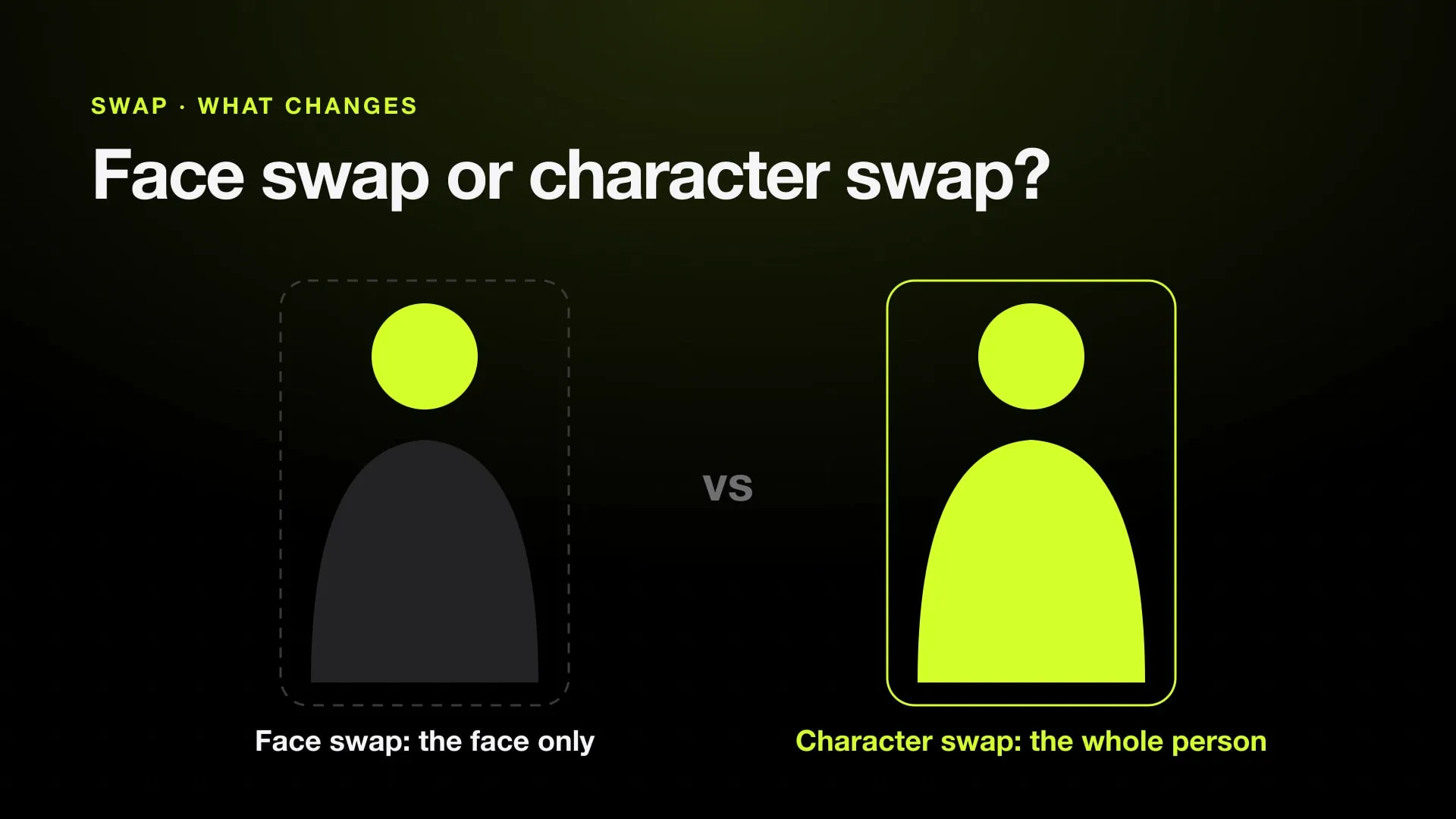
If the job is a face rather than the whole person, see face swap vs character swap first: a face swap tool may be all you need. For every character swap tool in one table, see the best AI character swap tools in 2026.
Sources
- Viggle AI: pricing (checked October 24, 2026)
- Viggle: developer API
- Viggle API docs: create video from character animation
- Viggle-Animate on Hugging Face
- Viggle blog: Viggle-Animate, character replacement from a repainted frame (September 4, 2026)
- Viggle AI: Meme Maker on the App Store
- Magic Hour: pricing
- Magic Hour: changelog (Character Replace, July 3, 2026; free tool, July 27, 2026)
- Pika: pricing
- Pika: FAQ
- DomoAI: pricing
- DomoAI Help Center: Character to Video
- Runway: pricing
- Runway Academy: models and pricing
- Kling AI: Motion Control user guide (March 5, 2026)
- Kling AI blog: Kling Video 3.0 credit cost guide (July 28, 2026)
- SCAIL-2 on GitHub
- SCAIL-2 on Hugging Face
- scail2-mlx, a community MLX port
- Wan2.2-Animate-14B on Hugging Face
- Comfy docs: Wan 2.2 Animate
- Higgsfield: Recast (Character Swap)
- Swapjutsu on GitHub
Swap characters on your Mac.
Swapjutsu is free and open source. The prep runs on your Mac; only the render is billed, or nothing on your own ComfyUI.