Jutsu Studio
In short
- MiniMax H3 has open weights (H3-Base FL2VA and Ref2VA): video with stereo audio at a 768-pixel short edge, 24 fps, 4 to 15 seconds. 2K output is a hosted-only feature.
- ComfyUI's official H3 templates target NVIDIA GPUs. On Apple Silicon, users report the BF16 weights need about 96 GB of unified memory, and the INT8 files run on 64 GB only with the ComfyUI-AppleSilicon-FP8 custom node.
- One M-series user's real-world ComfyUI test took 48 minutes, and 18 minutes with a Turbo LoRA at 6 steps. h3.c, a native Metal engine, denoises a 0.9-second 512×512 test in about 3.5 seconds at 4 steps on an M5 Max.
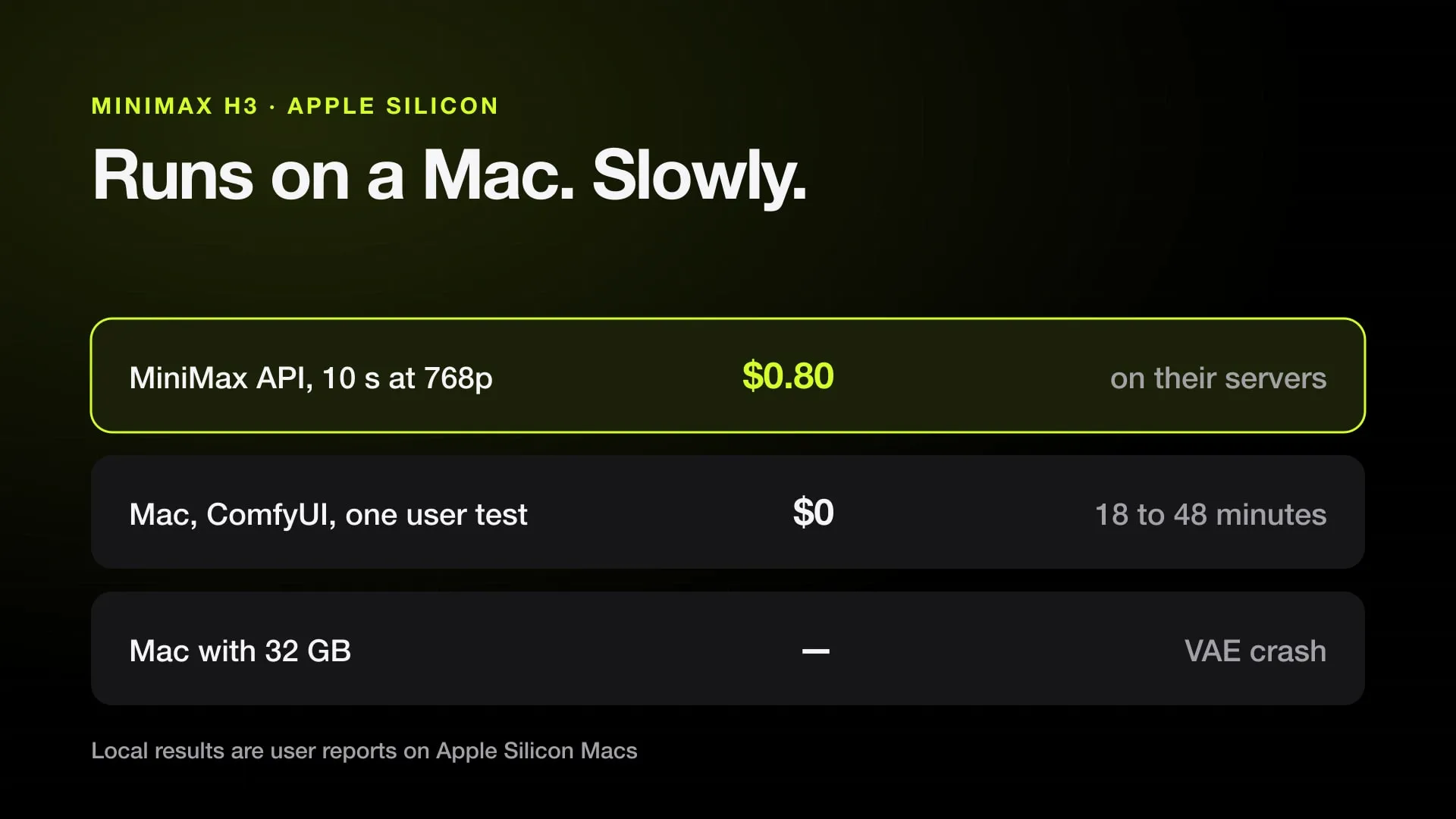
- Hosted, MiniMax's own API charged $0.08 a second at 768p with audio on October 31, 2026, $0.80 for a 10-second clip; the cheapest reseller, kie.ai, charged $0.04.
- The MiniMax H3 Community License lists the US, EU, UK and South Korea as Excluded Territories that need a separate license, and commercial use of local outputs needs a license sold through Comfy.
MiniMax H3 can run on a Mac, but only on a big one and slowly. Its open weights work on Apple Silicon through ComfyUI with community custom nodes, through h3.c, a native Metal engine, or through apps built on it such as ltx-video-mac. Users report needing a Max-class chip with 64 GB or more of unified memory, and renders of a few seconds take tens of minutes. For most people on a Mac, a hosted API is faster and cheap: 10 seconds at 768p cost $0.80 on MiniMax’s own API and $0.40 on kie.ai on October 31, 2026.
This post collects what is known as of October 31, 2026. Mac support comes from community projects and individual reports, not from MiniMax or Comfy, and it changes week to week.
What the open weights include
MiniMax released H3-Base as two checkpoints on Hugging Face:
- FL2VA for text-to-video and image-to-video, with optional first and last frames.
- Ref2VA for reference-to-video: up to 9 images, 3 video clips and 3 audio clips as references.
Both make video with synchronized stereo audio at a 768-pixel short edge (1344×768 for 16:9), 24 fps, 4 to 15 seconds. The open release does not contain H3-Context-IR or H3-Regenerate-2K, so 2K output, which MiniMax’s API sells, needs a separate upscale pass when you run it yourself.
The license matters before you download. The MiniMax H3 Community License, in the revision MiniMax reviewed on August 26, 2026, lists the United States, the European Union, the United Kingdom and South Korea as Excluded Territories that require a separate license. Comfy’s docs add that commercial use of locally generated outputs needs a MiniMax commercial license, which Comfy sells as the only official reseller; generations on Comfy Cloud include commercial rights.
Running it in ComfyUI on a Mac
ComfyUI 0.30.0 and later ships native H3 templates (Template Library → Video → MiniMax H3 T2V, I2V or R2V). They download pruned, quantized files: the diffusion models in INT8 and a 32B Qwen3-VL text encoder in NVFP4, a format made for NVIDIA GPUs. MiniMax doesn’t publish minimum hardware for them, and on a Mac the INT8 and FP8 files don’t load without extra nodes.
What users report on Apple Silicon:
| Setup | Report |
|---|---|
| BF16 weights | Run on MPS with about 96 GB of unified memory |
| Pruned INT8 file (21 GB) on M4 Max, 64 GB | Runs with the ComfyUI-AppleSilicon-FP8 custom node; without it INT8 and FP8 fail on missing MPS operators |
| M3 Max, 32 GB | VAE error on the first run |
| M-series, real-world test | 48 minutes with an NVFP4 file, 24 with INT8 plus the Spectrum node, 18 with a Turbo LoRA at 6 steps |
| Official T2V workflow, M4 Max, 128 GB | Black video and NaN audio (ComfyUI issue 15315, closed by the reporter after the fixes below) |
The fixes posted for black output:
- Give image-to-video a reference image. On the tested Mac, the I2V path needed at least one image, even a blank placeholder, to set up the conditioning.
- Don’t start ComfyUI with
--force-fp16. One M4 Max user’s black output went away without it. - Stay under the MPS tensor limit. About 0.4 megapixels at 20 seconds worked, 1.0 megapixel at 20 seconds failed with “MPSGraph does not support tensor dims larger than INT_MAX”.
- Install ComfyUI-AppleSilicon-FP8 before loading INT8 or FP8 files, and update ComfyUI: an INT8 dequantize bug that broke Macs was fixed in August.
On 1344×768, the native canvas, expect each step to take minutes. Start at a small size and a short duration to check the setup before a full render.
h3.c: a native Metal engine
h3.c is an MIT-licensed MiniMax H3 engine for Apple Silicon written by antirez, the author of Redis, with about 3,000 GitHub stars. It loads the original BF16 checkpoint without conversion and runs text-to-video, first and last frames and Ref2VA references with Metal.
Its README reports, for a 22-frame (about 0.9-second) 512×512 test on an M5 Max, a 4-step denoise in about 3.5 seconds against 26.4 seconds for the reference quality run. An --ssd-streaming mode keeps only two diffusion blocks in memory, about 2 GB at that size instead of 36.5 GB, and reads the rest from SSD at a speed cost of 26 to 84%. That makes it the most practical route on a Mac with less memory, though full-length clips at 768p still take much longer than the test.
Wild H3C wraps h3.c as ComfyUI nodes. Its author measured about 32 seconds for a warm 512×512, 4-step run on a 128 GB MacBook Pro; a 64 GB M2 Max user reported black frames at several settings in Ref2VA.
Mac apps that run H3 without ComfyUI
- ltx-video-mac is a free, MIT-licensed SwiftUI app that added MiniMax H3 in version 2.3.69, running it through h3.c. It offers three H3 options: the official BF16 weights (about 144 GB of disk), Comfy-Org’s INT8 diffusion model (about 92 GB) and a Turbo build fixed at 6 steps. Its README asks for 32 GB of memory at least and 64 GB or more for higher resolutions, and it also serves a local REST API.
- Draw Things, free on the Mac App Store, lists MiniMax H3 among its video models. We found no published H3 timings for it.
More local video apps for the Mac are compared in the best AI video apps for Mac.
Is it worth running locally?
On a Mac, mostly for experiments. A 10-second clip at 768p costs $0.80 on MiniMax’s API and $0.40 on kie.ai, while a Mac renders the same length in tens of minutes at full load. Local makes sense if you need to keep footage off third-party servers or want to modify the model, and you are in a territory the license covers.
| Hosted, October 31, 2026 | 480p | 768p | 2K |
|---|---|---|---|
| Cheapest offer, per second with audio | $0.05 (fal) | $0.04 (kie.ai) | $0.065 (Higgsfield, kie.ai) |
| MiniMax official API, per second | not listed | $0.08 | $0.13 |
Every offer is on the MiniMax H3 price page, and how it compares with Seedance 2.5 is in Seedance 2.5 vs MiniMax H3. For ComfyUI on a Mac in general, see ComfyUI on Mac; for another open model that runs better on Apple Silicon, see Wan 2.2 on Mac.
MiniMax H3 from a Mac app
Jutsu Studio is a free, open-source Mac app that runs MiniMax H3 through Higgsfield, with your plan credits or a Higgsfield API key. The render happens on Higgsfield’s servers, the app shows the price before each one, and the result lands on your disk.
Sources
- MiniMax: Run and self-host MiniMax H3 (reviewed August 26, 2026)
- Comfy docs: MiniMax H3 video generation guide
- Hugging Face: MiniMaxAI/MiniMax-H3
- Hugging Face: Comfy-Org/MiniMax-H3, "Not supported for Apple silicon" discussion
- ComfyUI issue 15315: MiniMax H3 black video on Apple Silicon (M4 Max)
- antirez/h3.c: MiniMax H3 inference engine for Mac computers
- skaiy/wild-h3c-comfyui: h3.c as ComfyUI nodes
- pawel-mazurkiewicz/ComfyUI-AppleSilicon-FP8
Run Higgsfield from your Mac.
Jutsu Studio is a free, open-source Higgsfield desktop app for Mac: a queue, a local library and the price on every button.