Jutsu Studio
In short
- Pinokio is a free, MIT-licensed desktop app that installs and launches open-source AI apps from scripts. Version 8.2.0 (September 2, 2026) ships for macOS on Apple Silicon and Intel, 64-bit Windows and Linux.
- A Pinokio script can run any shell command on your computer. Scripts on the Discover page are reviewed by the Pinokio admin and kept under the pinokiofactory GitHub organization; other scripts are not reviewed.
- Wan2GP, now named WanGP, runs Wan 2.1/2.2, LTX-2, Hunyuan Video and MiniMax H3 on NVIDIA or AMD GPUs. Its Pinokio script asks for 6 GB of VRAM and 16 GB of RAM; Mac support is not documented.
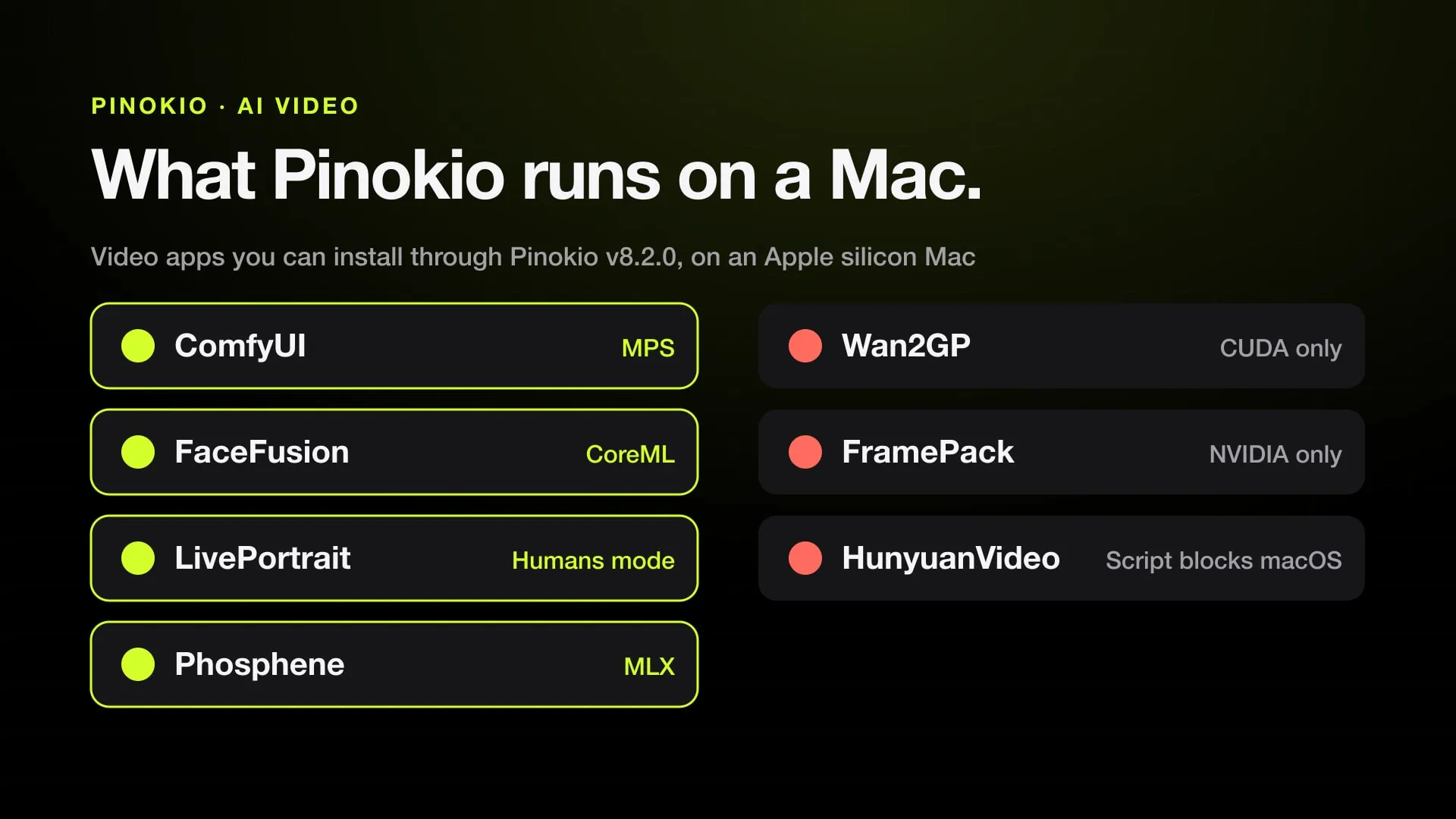
- On Apple Silicon, ComfyUI, FaceFusion and LivePortrait install and run; FramePack is NVIDIA-only. Phosphene runs LTX-2.5 locally on Macs with 16 GB or more.
- Pinokio delays npm, uv and bun installs by 72 hours by default, but not pip, conda or brew, and not its built-in install flows.
Pinokio is a free, open-source desktop app that installs and runs AI apps with one click. You pick an app such as Wan2GP, FaceFusion or ComfyUI, press Install, and Pinokio downloads the project, its Python environment and its dependencies, then opens the app in a local web page. It runs on macOS, Windows and Linux. It is MIT-licensed, at version 8.2.0 since September 2, 2026, and has 8,343 stars on GitHub.
What it installs is another matter. Most AI video apps in Pinokio are built for NVIDIA GPUs, and some refuse to install on a Mac. Below: what Pinokio is, how safe its scripts are, how to install it, which video apps you can get through it and what each one needs, with a separate section on Apple Silicon. Everything was checked on November 1, 2026, from each project’s own repository and docs.
What Pinokio is
The project calls itself a “1-click launcher for any open-source project” and compares itself to a terminal with a user interface. It ships with its own Python, Node.js, Bun, Git, uv, Conda, Homebrew, FFmpeg and Caddy, so you don’t need any of them on the machine first.
Each app is a small set of scripts, usually install.js, start.js, update.js and reset.js, written in a JSON-like syntax. A script clones the app’s repository, creates a virtual environment, installs the right PyTorch build for your GPU and starts the app’s server. Pinokio then shows the app’s web interface in its own window, with its update and reset scripts one click away.
The current site is pinokio.co. The old pinokio.computer address redirects there, and the desktop docs live at desktop.pinokio.co. The source and installers are on GitHub at pinokiocomputer/pinokio.
Is Pinokio free and safe?
Pinokio is free. The app is MIT-licensed and free to download. The apps it installs keep their own licenses, listed in the table below.
Safety is a question about scripts, not about the launcher. Pinokio’s own README is direct about it: “Scripts can run anything.” A script can run any shell command, download files and execute them, with the same permissions as your user account. What protects you:
- Verified scripts. Apps on the Discover page come from publishers verified by the Pinokio admin. Their repositories are transferred to the pinokiofactory GitHub organization and frozen there, then reviewed and tested before they are listed. The admin can delist or fix a script later.
- Isolation by convention. Scripts run under
~/pinokio/api, and tools installed through Pinokio’s package managers go into~/pinokio/bin. The review checks that a script stays inside those folders and installs Python packages into each app’s ownvenv. This is a rule checked by a person, not an operating-system sandbox; the README says the risk is “when a script intentionally tries to deviate” from it. - Open scripts. Every script comes from a public Git repository, and the install screen shows the repository URL before it runs.
- Package delay. Pinokio’s Bluefairy feature makes npm, uv and bun skip packages published in the last 72 hours, a guard against freshly hijacked packages. It does not cover pip, conda, brew, npx, uvx or cargo, and Pinokio’s built-in install, reinstall and repair flows turn it off by default.
In practice: apps from the Discover page under pinokiofactory, or from a project’s own official script such as facefusion/facefusion-pinokio, have had a human look at them. A script from a random link has not. Read it first, or don’t run it. The models and code an app downloads are another layer that the review does not audit line by line.
How to install Pinokio on Mac, Windows and Linux
Download from pinokio.co, which links to the GitHub release. Version 8.2.0 has these builds:
| System | File | Notes |
|---|---|---|
| macOS, Apple Silicon | Pinokio-8.2.0-arm64.dmg |
For M1 and later |
| macOS, Intel | Pinokio-8.2.0.dmg |
Few AI video apps run on Intel Macs |
| Windows | Pinokio.exe |
64-bit installer |
| Linux | AppImage, .deb or .rpm |
x64 and ARM64 builds |
- Install the app. On a Mac, open the
.dmgand move Pinokio to Applications. On Windows, runPinokio.exe. On Linux, make the AppImage executable and run it, or install the.debor.rpmwith your package manager. - Open it and pick an app. Browse the app directory and open the app’s page. Check that the script’s repository is the one you expect.
- Press Install. The first app takes longest, because Pinokio sets up its tools and the app downloads PyTorch and its models. Video apps often download tens of gigabytes, so check your free disk space first.
- Start it. When install finishes, press Start. The app opens in Pinokio, and you can also use it from a browser on localhost.
Each app’s files stay under the Pinokio home folder. Pinokio 8.2.0 also added Disk Saver, which finds identical model files that several apps downloaded and lets them share one copy on disk.
AI video apps you can install through Pinokio
These are the video apps most people look for, with what each project says about hardware. “Mac” means Apple Silicon.
| App | What it does | License | GPU need | Mac |
|---|---|---|---|---|
| Wan2GP (WanGP) | Text, image and video to video with Wan 2.1/2.2, LTX-2, Hunyuan Video, MiniMax H3 and more | WanGP Community License 2.0: free to use, not to resell | NVIDIA GTX 10XX or newer, or AMD RDNA 2 or newer; Pinokio script asks for 6 GB VRAM and 16 GB RAM | Not documented; open bug report |
| FaceFusion | Face swap, face and lip editing, enhancement | OpenRAIL-AS | Runs on CUDA, DirectML, MIGraphX, OpenVINO or CPU | Yes, with CoreML |
| LivePortrait | Animates a portrait photo from a driving video | MIT | NVIDIA with CUDA on Linux and Windows | Yes, Humans mode only; “maybe 20x slower than RTX 4090” |
| ComfyUI | Node-graph app for image and video models | GPL-3.0 | NVIDIA best supported; also AMD | Yes, through PyTorch MPS |
| FramePack | Generates video progressively, frame section by section, from an image | Apache 2.0 | NVIDIA RTX 30XX, 40XX or 50XX, 6 GB or more | No: Linux and Windows only |
| HunyuanVideo (GP) | Hunyuan Video in a low-VRAM interface | The model’s own license | NVIDIA only | No: the Pinokio script blocks macOS and AMD |
| Phosphene | LTX-2.5 and MiniMax H3 video with sound, lip sync, songs | MIT code; each model its own license | Apple Silicon only | Yes, native MLX; from 16 GB of memory |
FaceFusion’s Pinokio script comes from the FaceFusion team itself and pins version 3.9.2. On Linux and Windows it installs the CUDA, DirectML, MIGraphX or OpenVINO build to match your GPU; on a Mac it runs the default install, which FaceFusion’s docs list for CoreML. For a full guide, see FaceFusion. For lip sync in particular, other open models are compared in open-source lip sync.
ComfyUI on a Mac works, but large video models are slow and can’t load FP8 files; setup and limits are in ComfyUI on Mac.
Wan2GP (WanGP)
Wan2GP is DeepBeepMeep’s web app for running open generative models on modest hardware, “for the GPU Poor” in its own words. The repository is now deepbeepmeep/WanGP (the old Wan2GP address redirects), with about 11,300 stars. Version 19.0 came out on October 31, 2026.
It has grown well past Wan. The README lists video models (Wan 2.1/2.2 and models built on them, MiniMax H3, LTX-2/2.3/2.5, Hunyuan Video 1/1.5, LongCat, Kandinsky, LTXV), image models such as Flux and Qwen Image, speech and music models, 3D models and an assistant called Deepy Prime. It has a generation queue, LoRA support, a headless mode and an API.
What it needs:
- GPU. NVIDIA cards from GTX 10XX to RTX 50XX, and AMD RDNA 2, 3, 3.5 and 4. The README says select models run on “as little as 4 GB of VRAM”.
- Pinokio script. The pinokiofactory script describes Wan2GP as for “GPU poor machines (6GB+ VRAM)” and stops on Windows and Linux if there is less, with the message that you need “at least 6 GB VRAM and at least 16 GB System RAM”. On NVIDIA it also asks for driver R580 or newer for CUDA 13.
- License. The WanGP Community License 2.0 lets you use it free, including at a company, and sell what you make with it. You may not sell WanGP itself or offer it as a paid hosted service. That makes it free to use but not open source in the OSI sense.
The README lists Pinokio as one of four install routes and recommends the community scripts wan2gp or wan2gp-amd by Morpheus over the official Pinokio install. The others are its own .bat and .sh scripts, the Wan2GP Desktop launcher and an experimental Windows app, WanGP Manager.
On a Mac, the README names no Apple GPU, and the Pinokio script skips the VRAM check on macOS rather than supporting it. An open issue from April 4, 2026 reports that Wan2GP installed through Pinokio on a Mac stops at start with “Torch not compiled with CUDA enabled”. We found no documentation that it runs on Apple Silicon. For Wan on a Mac, see Wan 2.2 on a Mac and Wan 2.2 Animate on a Mac.
What works on Apple Silicon
Pinokio itself runs fine on an M-series Mac. The apps split three ways:
- Runs: ComfyUI on PyTorch’s MPS backend, with a Mac model set in its Pinokio script. FaceFusion with CoreML. LivePortrait in Humans mode; its Animals mode needs a dependency that doesn’t support macOS. These are the best bets for faces and portraits.
- Built for the Mac: Phosphene, an MIT-licensed app installed through Pinokio, runs LTX-2.5 and MiniMax H3 with Apple’s MLX. Its README says it works from 16 GB of memory, MiniMax H3 needs 36 GB, and the first install downloads 27.5 GB. On an M4 Max with 64 GB, it reports about 6 minutes for a 5-second LTX-2.5 clip at High; across its users, a 5-second 480p clip took a median 10 minutes 40 seconds on a 16 GB M4. Its README also notes that MiniMax H3’s license excludes the EU, UK, South Korea and the US.
- Doesn’t run: FramePack (Linux and Windows, NVIDIA only) and HunyuanVideo, whose Pinokio script blocks macOS. Wan2GP has no documented Mac support.
Memory decides more than chip generation. A Mac shares one pool between the system and the GPU, so the model files have to fit next to macOS. More local options, compared side by side, are in local AI video generators for Mac and the best AI video apps for Mac.
Where a native Mac app fits instead
Pinokio is the quickest way to try open models, but on a Mac many of the strongest video models either don’t install or run for many minutes per clip. If what you want is finished clips from closed models, a native app that sends the work to a hosted service is the other route.
Jutsu Studio is a free, open-source native Mac app for Higgsfield’s hosted models (Seedance, Kling, Genjutsu and more). It shows the price before each job, runs a queue and saves results with prompt and cost; generation runs on Higgsfield, not locally. The open-source projects that cover parts of Higgsfield’s features are listed in open-source Higgsfield.
If you have a Windows or Linux PC with an NVIDIA GPU and want local character swap, Kawarimi is our MIT open-source app for local whole-character swap with Wan 2.2 Animate on a Windows or Linux NVIDIA PC (12 GB VRAM or more recommended).
Sources
- pinokiocomputer/pinokio on GitHub: README, script policy and security (checked November 1, 2026)
- Pinokio releases on GitHub, v8.2.0 (checked November 1, 2026)
- Pinokio manual: Package Install Protection (checked November 1, 2026)
- pinokiofactory/wan, the Wan2GP Pinokio script (checked November 1, 2026)
- deepbeepmeep/WanGP on GitHub: README and license (checked November 1, 2026)
- WanGP issue 1680: Torch not compiled with CUDA enabled on Mac (checked November 1, 2026)
- FaceFusion docs: installation (checked November 1, 2026)
- facefusion/facefusion-pinokio on GitHub (checked November 1, 2026)
- KlingAIResearch/LivePortrait on GitHub (checked November 1, 2026)
- lllyasviel/FramePack on GitHub (checked November 1, 2026)
- Comfy-Org/ComfyUI on GitHub (checked November 1, 2026)
- mrbizarro/Phosphene on GitHub: Mac requirements (checked November 1, 2026)
Run Higgsfield from your Mac.
Jutsu Studio is a free, open-source Higgsfield desktop app for Mac: a queue, a local library and the price on every button.