Jutsu Studio
In short
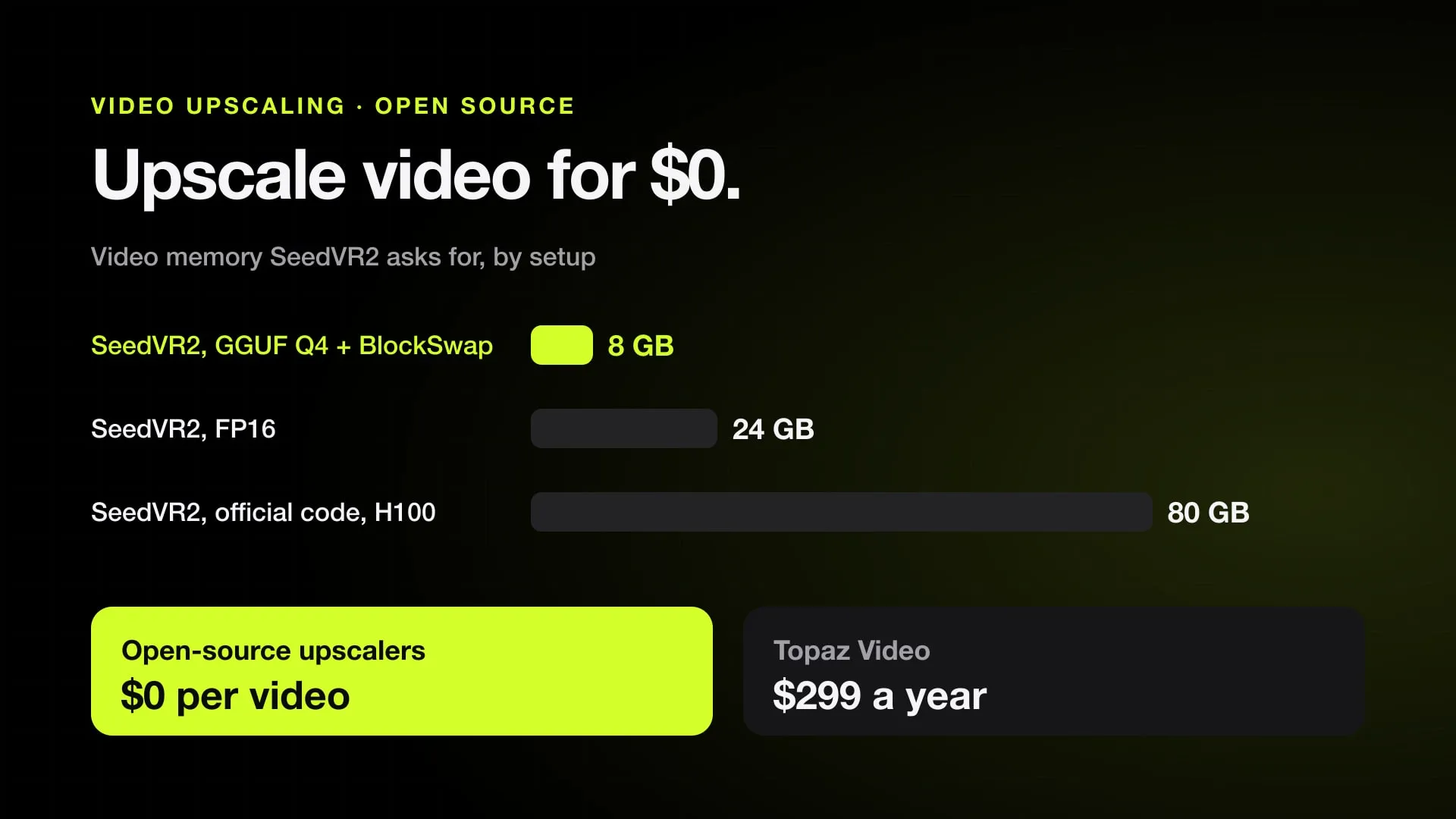
- SeedVR2 from ByteDance Seed is the strongest free choice for AI video: Apache 2.0 code and weights, 3B and 7B models, and a ComfyUI node that runs it in 8 GB of VRAM or less with GGUF and BlockSwap.
- FlashVSR, also Apache 2.0, claims about 17 fps for 768×1408 video on one A100, but its official build is tested only on NVIDIA A100, A800 and H200.
- Real-ESRGAN (BSD-3-Clause) and Video2X (AGPL-3.0) are the light GAN route: Video2X runs Real-ESRGAN, Real-CUGAN and RIFE on any Vulkan GPU, on Windows and Linux.
- Topaz Video costs $299 a year or $59 month to month, with unlimited local rendering; its Starlight Sharp, HQ and Fast models are not supported locally on a Mac.
- An upscaler sharpens damage, it doesn't repair it: a warped hand or a smeared face in the draft needs a new take, not more pixels.
A video upscaler raises the resolution of a clip and rebuilds detail that the source doesn’t have. The paid default is Topaz Video at $299 a year. The free, open-source options split into two kinds: diffusion upscalers such as SeedVR2 and FlashVSR, which invent plausible detail and need a strong GPU, and GAN upscalers such as Real-ESRGAN and the Video2X app built around it, which are lighter, older and run almost anywhere.
Everything below comes from each project’s own README, license file and model card, and from Topaz’s own pages, checked on November 1, 2026. Speeds and quality claims are the authors’ own and are attributed as such; we did not benchmark these tools against each other.
The short answer
- Best free upscaler for AI video: SeedVR2, through the numz ComfyUI node. Use the 3B model unless you have 24 GB of VRAM or more.
- Fastest diffusion upscaler, on paper: FlashVSR, if you have a data-center NVIDIA GPU.
- Light, simple, any GPU: Video2X with Real-ESRGAN or Real-CUGAN, on Windows or Linux.
- On a Mac: SeedVR2 in ComfyUI on MPS with FP16 or GGUF files, or Real-ESRGAN for a fast pass.
- Not for video: SUPIR, which restores still images and is licensed for non-commercial use only.
Comparison table
| Model | License | Type | VRAM | Mac | ComfyUI |
|---|---|---|---|---|---|
| SeedVR2 3B / 7B | Apache 2.0, code and weights | One-step diffusion transformer | 8 GB or less with GGUF and BlockSwap; 24 GB+ for FP16 | MPS, through the ComfyUI node | numz node, 4 nodes |
| FlashVSR v1.1 | Apache 2.0, code and weights | One-step streaming diffusion | Not published; tested on A100, A800, H200 | Not covered | Community nodes |
| Real-ESRGAN | BSD-3-Clause; ncnn build MIT | GAN | Not published; tile size lowers it | macOS ncnn build from 2022 | Built-in upscale-model nodes |
| Video2X 6.4.0 | AGPL-3.0 | Wrapper: Real-ESRGAN, Real-CUGAN (GAN), RIFE, Anime4K | Any Vulkan GPU | Container image only | No |
| SUPIR | Non-commercial declaration | SDXL diffusion, images | 12 GB diffusion plus 16 GB LLaVA in low-memory mode | Not stated | Not checked |
| Topaz Video (paid) | Proprietary, $299 a year | Several models, incl. Starlight | Not checked | Native, but Starlight Sharp, HQ and Fast are cloud only | No |
The tools
SeedVR2
SeedVR2 is ByteDance Seed’s video restoration model, accepted at ICLR 2026. It restores and upscales in a single diffusion step, which is what makes a diffusion upscaler usable on long clips. Both the code and the 3B and 7B weights are Apache 2.0, so commercial use is allowed.
The official repo is built for large NVIDIA GPUs: one H100 with 80 GB handles 100 frames at 720×1280, and 1080p or 2K takes four H100s with sequence parallelism. The usual way to run it is numz/ComfyUI-SeedVR2_VideoUpscaler instead, which the SeedVR authors credit in their README. Its version 2.5.24 (December 24, 2025) adds BlockSwap, VAE tiling, GGUF models and a standalone command line, and lists three tiers:
- 8 GB of VRAM or less: GGUF Q4_K_M with BlockSwap and VAE tiling.
- 12 to 16 GB: FP8, with BlockSwap or tiling as needed.
- 24 GB or more: FP16, for the best quality and speed.
The model files on Hugging Face are 6.78 GB for the 3B in FP16 and 3.39 GB in FP8, and 16.48 GB for the 7B in FP16 and 8.24 GB in FP8, plus a 0.5 GB VAE. The node downloads them on first use. There are also “sharp” 7B variants for more detail.
One limitation matters for AI video. The authors write that SeedVR2 tends to “overly generate details” on inputs with very light damage, naming 720p AI-generated video as the example, which “occasionally” gives oversharpened results, especially at 480p. On clean AI footage, check the result against the source before you commit a long batch.
FlashVSR
FlashVSR, from OpenImagingLab and accepted at CVPR 2026, is a one-step streaming diffusion upscaler. Its authors say it runs at about 17 fps for 768×1408 video on a single A100 and up to about 12 times faster than earlier one-step diffusion upscalers. It is built mainly for 4× upscaling, which the README “strongly” recommends. Code and weights are Apache 2.0; v1.1 (November 2025) is the recommended version, with a 5.68 GB main model and Wan 2.1’s VAE. FlashVSR+ followed in October 2026.
The catch is hardware. FlashVSR needs a Block-Sparse Attention backend that you compile yourself. The README says it works on NVIDIA A100 and A800, runs on H200 with limited speedup, and that compatibility on RTX 40 and 50 cards is “currently unknown.” Macs are not mentioned.
There are four community ComfyUI nodes. The FlashVSR authors warn that some of them, including early versions, drop the locality-constrained sparse attention and fall back to dense attention, which “may lead to noticeable quality degradation,” especially at higher resolutions.
Real-ESRGAN
Real-ESRGAN, from Xintao Wang, is a GAN upscaler and the oldest tool here. The main repo is BSD-3-Clause, the ncnn-vulkan port is MIT, and there is a small model for anime video (AnimeVideo-v3) next to the general x4plus models. It does not invent detail the way a diffusion model does, and it processes video as separate frames, but it is light and fast.
The ncnn-vulkan build ships as a portable executable for Windows, Linux and macOS. The last one is from April 2022, and the README describes the builds as for “Intel/AMD/Nvidia GPU”; Apple Silicon isn’t mentioned. In ComfyUI, the built-in Load Upscale Model and Upscale Image (using Model) nodes load Real-ESRGAN files through the Spandrel library, so no custom node is needed.
Video2X
Video2X is not a model but an app that runs upscalers and frame interpolation on whole videos. Version 6 is a rewrite in C and C++ that runs Real-ESRGAN, Real-CUGAN and RIFE through ncnn and Vulkan, plus Anime4K v4 shaders, with no extra disk space for frames during processing. The latest release is 6.4.0, from January 24, 2025, and it is licensed AGPL-3.0.
It needs a CPU with AVX2 and a GPU with Vulkan, from NVIDIA Kepler, AMD GCN 1.0 or Intel HD 4000 onward. There are a Windows installer, Arch Linux packages and an AppImage. There is no Mac build: the README offers a container image “for Linux and macOS,” and a free Google Colab notebook on an NVIDIA T4, L4 or A100 for up to 12 hours a session.
SUPIR
SUPIR is often listed next to video upscalers, but its repo restores photos. It is built on SDXL with a LLaVA 13B model for captions, and its low-memory mode still uses 12 GB for diffusion and 16 GB for LLaVA. The README carries a “Non-Commercial Use Only Declaration,” so client work needs written permission. For video, SeedVR2 or FlashVSR are the diffusion choices.
Upscaling AI video: what an upscaler can’t fix
An upscaler sharpens damage, it doesn’t repair it. It works from what is in the frames, so a hand with six fingers becomes a sharper hand with six fingers, and a face that smeared at 480p becomes painted-looking eyes and hard highlights at 1080p. Diffusion upscalers can invent new detail, but they invent it on top of the error, frame by frame, not by regenerating the motion.
Three rules follow:
- Judge the draft, not the upscale. Problems that come from the input, such as a face too small in the frame, are already visible at 480p. If the draft is wrong, fix the take before you spend time on resolution.
- Upscale the take you approved. An upscaler earns its place on a 480p or 720p draft that is already right; a clip rendered at 1080p by the video model has less to gain.
- Watch for oversharpening. SeedVR2’s own notes say clean, lightly damaged AI video is where it oversharpens most.
Free upscalers vs Topaz Video
Topaz Video costs $299 a year, $59 month to month, or $39 a month on a 12-month commitment, and is also part of Topaz Studio at $399 a year. Pro, with full commercial use, is $699 a year. Plans include unlimited local rendering and 25 cloud credits a month (100 on Pro), which expire monthly. It covers more than upscaling: denoising, focus recovery, frame interpolation, slow motion and SDR to HDR, with output “up to 4K” on its latest models.
What the free tools give up is the app: Topaz is a desktop program with presets and a preview, while SeedVR2 and FlashVSR are Python projects or ComfyUI graphs you set up yourself. What they give back is the price and the license: Apache 2.0 code and weights cost nothing per clip and can be used commercially. We have no independent comparison of output quality between Topaz and SeedVR2 to cite, so test both on your own clip before paying.
On a Mac
Most of this field is built for NVIDIA. On an Apple Silicon Mac, what works:
- SeedVR2 in ComfyUI. The numz node targets MPS and its release notes carry a run of Apple Silicon fixes. ComfyUI on a Mac cannot load FP8 files, so use FP16 or GGUF: the 3B FP16 file is 6.78 GB and the 7B 16.48 GB, and both have to fit in unified memory next to macOS. Setup and memory limits are in ComfyUI on Mac.
- Real-ESRGAN. Through ComfyUI’s built-in upscale-model nodes, or the 2022 macOS command-line build.
- Not on a Mac: FlashVSR’s official build and Video2X’s native packages.
- Apple’s own. macOS 26 adds a super-resolution scaler to VideoToolbox (VTSuperResolutionScalerConfiguration), with models the system downloads on demand. It is an API for developers, not an app you open.
For the bigger picture of what runs locally, see local AI video generators on a Mac, Wan 2.2 on a Mac and Pinokio for AI video. The apps worth having are in best AI video apps for Mac.
Where Jutsu Studio fits
Jutsu Studio is a free, open-source Mac app for Higgsfield that upscales drafts for free on the Mac itself: an on-device upscale for videos up to 720p and images up to 1920×1080, which adds a new version of the item instead of replacing it. For final renders, it can also run Higgsfield’s paid Upscale from the same library.
Sources
- ByteDance-Seed/SeedVR on GitHub (checked November 1, 2026)
- numz/ComfyUI-SeedVR2_VideoUpscaler on GitHub (checked November 1, 2026)
- numz/SeedVR2_comfyUI model files on Hugging Face (checked November 1, 2026)
- OpenImagingLab/FlashVSR on GitHub (checked November 1, 2026)
- FlashVSR v1.1 on Hugging Face (checked November 1, 2026)
- xinntao/Real-ESRGAN on GitHub (checked November 1, 2026)
- k4yt3x/video2x on GitHub (checked November 1, 2026)
- Fanghua-Yu/SUPIR on GitHub (checked November 1, 2026)
- ComfyUI: Load Upscale Model and Upscale Image (using Model) nodes (checked November 1, 2026)
- Topaz Labs: Topaz Video (checked November 1, 2026)
- Topaz Labs: pricing (checked November 1, 2026)
- Apple Developer: VTSuperResolutionScalerConfiguration (checked November 1, 2026)
Run Higgsfield from your Mac.
Jutsu Studio is a free, open-source Higgsfield desktop app for Mac: a queue, a local library and the price on every button.