Jutsu Studio
brew install --cask jutsuhq/tap/jutsu-studioIn short
- Higgsfield has no official Mac app: its help center says it "has no mobile apps and no desktop app" (checked November 14, 2026).
- Jutsu Studio is a free, open-source (MIT) native Mac app for Higgsfield, for macOS 14 or later on Apple silicon and Intel. It is unofficial and runs on your own Higgsfield account or API key.
- Version 0.2.6 is a 25 MB DMG signed and notarized by Apple; it also installs with brew install --cask jutsuhq/tap/jutsu-studio.
- A 10-second Genjutsu motion transfer at 720p costs $3.45 through the API ($0.3446 a second, checked November 14, 2026) or 70 plan credits, about $3.44 on the Plus plan. Jutsu Studio adds nothing to that price.
- Safari on macOS Sonoma or later can add higgsfield.ai to the Dock as a web app. That is the website in its own window, not a native app.
No, there is no official Higgsfield app for Mac. Higgsfield’s help center says it “has no mobile apps and no desktop app” (checked November 14, 2026), so on a Mac you use higgsfield.ai in Safari or Chrome. For a native Mac app, Jutsu Studio is free and open source: a 25 MB app for macOS 14 or later, on Apple silicon and Intel, that runs Higgsfield’s models such as Genjutsu, Seedance 2.5 and Kling 4.0 on your own Higgsfield account or API key. It is made by an independent developer; Higgsfield does not make or endorse it.
- Want the website in its own window: add higgsfield.ai to the Dock from Safari (below).
- Want a real Mac app with a queue and files on your disk: download Jutsu Studio.
- Work in Premiere Pro, After Effects or DaVinci Resolve: Higgsfield’s own plugins install on macOS.
For Windows, Linux and the agent options (MCP, CLI, API), see the full Higgsfield desktop app guide.
Every way to use Higgsfield on a Mac
| Option | Made by | What you install | Results kept | Best for |
|---|---|---|---|---|
| higgsfield.ai in Safari or Chrome | Higgsfield | Nothing | In Assets on higgsfield.ai | One generation at a time |
| Safari web app in the Dock | Higgsfield’s site, Apple’s wrapper | Nothing (File › Add to Dock) | In Assets on higgsfield.ai | The website in its own window |
| Plugins for Photoshop, Premiere Pro, After Effects, DaVinci Resolve, Blender, Figma | Higgsfield | A plugin inside each app | In the editor’s project | Editors who generate inside a timeline |
| Claude Desktop with Higgsfield MCP | Higgsfield and Anthropic | Claude Desktop | In Assets on higgsfield.ai | Generating from a chat |
| Jutsu Studio | Independent, open source | A 25 MB native app | Downloaded to ~/Movies/Jutsu Studio |
Many clips, many takes, a local library |
The website is the only place where your plan’s unlimited models and free generations apply; Higgsfield’s help pages say they do not carry over to MCP or the CLI. Jutsu Studio can use them when you connect a Higgsfield account rather than an API key.
Add Higgsfield to the Dock with Safari
This is what most “Higgsfield Mac app” answers point to, and it takes ten seconds:
- Open higgsfield.ai in Safari on macOS Sonoma or later and sign in.
- Choose File › Add to Dock, keep the name “Higgsfield” and click Add.
- Open it from the Dock or Launchpad. It runs in its own window with its own icon.
In Chrome the same thing is ⋮ › Cast, save and share › Install page as app. Either way it is still the website: the same one-at-a-time flow, results in Assets on higgsfield.ai, nothing on your disk unless you download it, and the tab has to stay open while a job runs.
What a native Mac app adds
Jutsu Studio talks to Higgsfield directly and keeps the work on the Mac:
- Files on your disk. Every result downloads to
~/Movies/Jutsu Studio/Videosas soon as it is ready, with its source clip, references, prompt and cost. The library opens offline. - Drag from Finder. Drop a MOV, HEVC or ProRes file; the app trims it on the Mac and uploads only the 4–30 second range you pick, so you pay only for that range.
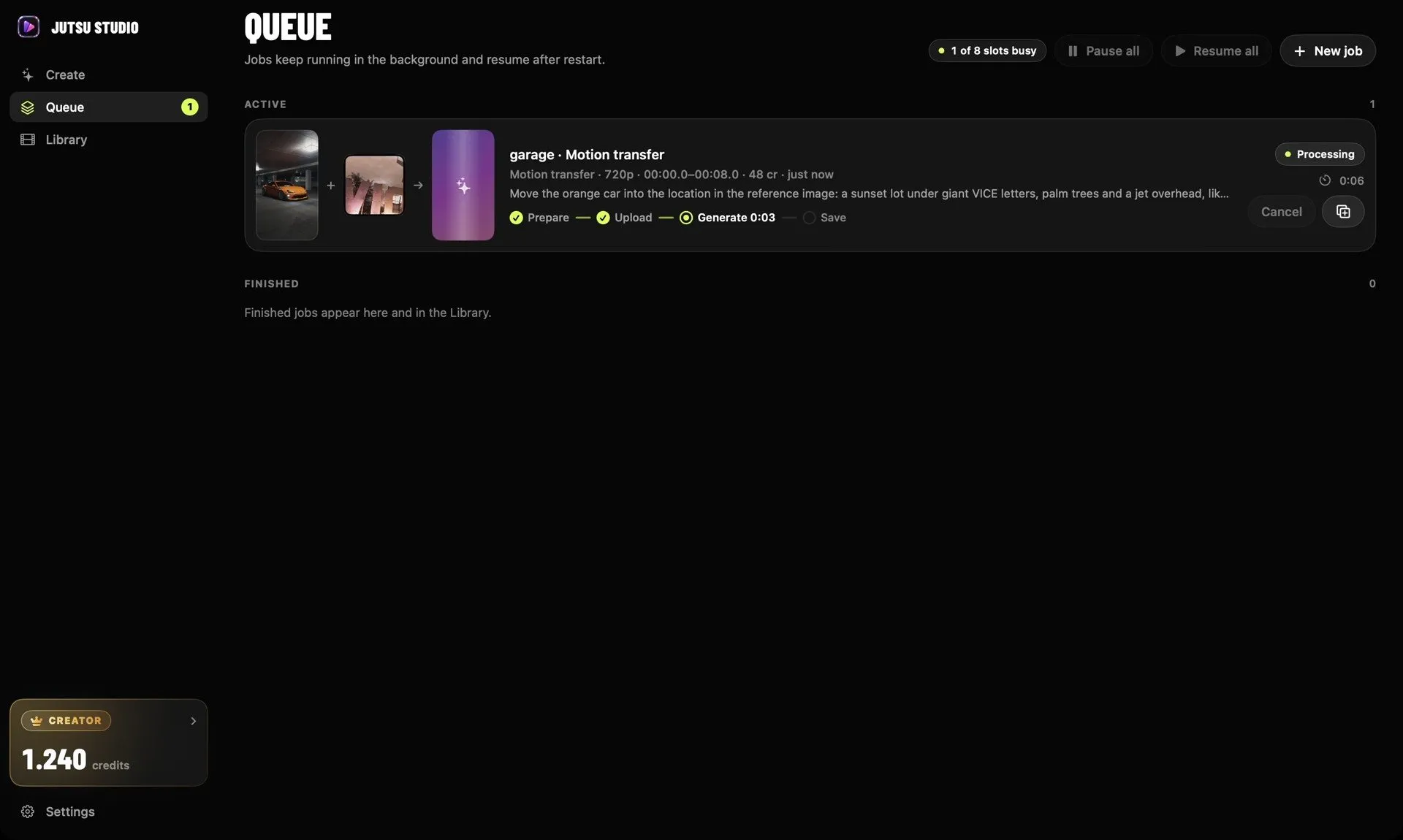
- A queue that keeps running. Close the window and jobs carry on in the background, show in the menu bar and send a notification when done. They pick up again after a restart without paying twice.
- The price before the click. Each Generate button shows what the job costs, and an optional daily cap stops spending past a limit.
- Mac editors. One click exports ProRes 422 or H.264 for Final Cut Pro, Premiere Pro or DaVinci Resolve.
- Free work on the Mac. Smoothing, slow motion, upscaling and subtitles run on the Mac itself and cost nothing.
- Your login stays yours. You sign in through Higgsfield’s own page in the browser, and credentials sit in the macOS Keychain. There is no Jutsu server and no telemetry.
The video itself is still generated on Higgsfield’s servers, so a MacBook Air does the same job as a Mac Studio.
What it costs
The app is free and adds no markup: Higgsfield bills your own account. The same 10-second clip at 720p, at prices checked November 14, 2026:
| Model | With an API key | On a plan (Plus, $59 for 1,200 credits) |
|---|---|---|
| Genjutsu motion transfer | $3.45 ($0.3446 a second) | 70 credits, about $3.44 |
| Genjutsu Lite motion transfer | $1.47 ($0.1471 a second) | 20 credits, about $0.98 |
| Seedance 2.5 with a video reference | $3.26 ($0.3264 a second) | 70 credits, about $3.44 |
Every model and resolution is on the Higgsfield price table, and the credits calculator shows how many clips each plan buys.
Install Jutsu Studio on a Mac
It needs macOS 14 Sonoma or later and runs natively on Apple silicon and Intel. Version 0.2.6 is a 25 MB DMG, signed and notarized by Apple, so Gatekeeper opens it without warnings.
- Download the
.dmgfrom jutsustudio.com or the GitHub releases page. - Open it and drag Jutsu Studio to Applications.
- Open the app and connect your Higgsfield account or paste an API key.
Or with Homebrew:
brew install --cask jutsuhq/tap/jutsu-studioThe app updates itself when a new version ships.
What it does not do
- It does not generate video on your Mac; Higgsfield’s servers do, and they bill your account.
- It is not made by Higgsfield. Higgsfield warns that any downloadable app presenting itself as Higgsfield is a copy; Jutsu Studio says plainly it is unofficial, and its source is on GitHub.
- It does not run every Higgsfield tool. It covers 14 video models and a set of account tools (Upscale, Reframe, Remove Background, Dub, Change Voice); Canvas, Supercomputer and other web-only tools stay on the website.
On Windows or Linux, the same app is in Higgsfield Windows app and Higgsfield Linux app. On iPhone and iPad there is Jutsu for iPhone. If you want character swap with no Higgsfield bill at all, Swapjutsu runs Wan 2.2 Animate on your own GPU or Seedance 2.5 through Comfy credits.
Sources
- Higgsfield Help Center: What are the official Higgsfield platforms? (checked November 14, 2026)
- Higgsfield API: Genjutsu motion transfer pricing (checked November 14, 2026)
- Higgsfield: Premiere Pro and After Effects plugin
- Higgsfield: DaVinci Resolve plugin
- Apple Support: Use Safari web apps on Mac
- Jutsu Studio on GitHub (release 0.2.6)
Run Higgsfield from your desktop.
Jutsu Studio is a free, open-source Higgsfield desktop app for Mac, Windows and Linux: a queue, a local library and the price on every button.